

LibraryThe daily build12 min read
The CRM CSV Scrubber: Why contact list imports break and how we fixed it in the browser
Every CRM import begins with a dirty spreadsheet. We built a zero-setup, in-browser sanitizer that splits names, strips tracking parameters from domains, cleans phone numbers, and catches duplicates before they corrupt your database.
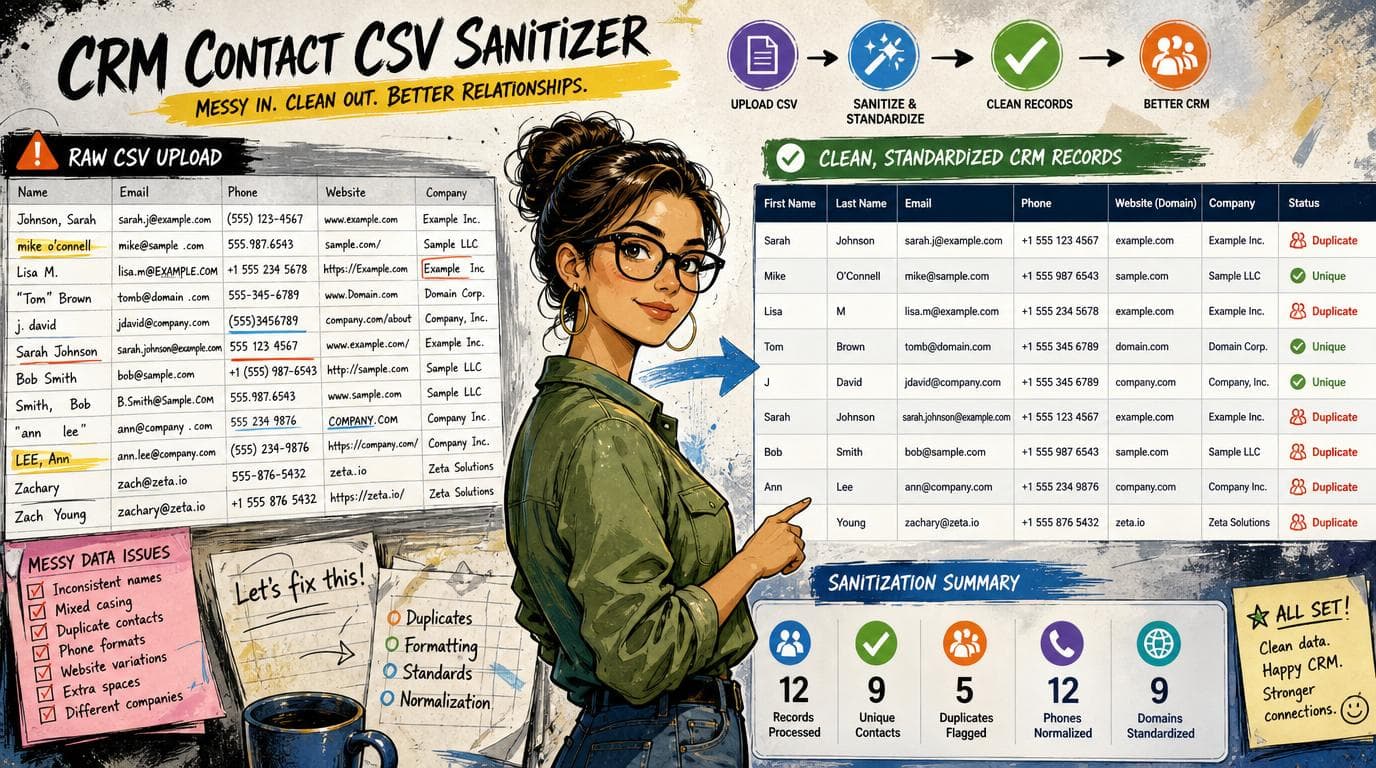
Every operator who has ever managed a CRM has experienced the exact same moment of dread. You receive an export of three hundred leads from an event booth, a partner co-marketing webinar, or a legacy billing system. You open the file, glance at the columns, and immediately realize that if you click import into HubSpot or Salesforce right now, your database is going to be littered with broken tokens, duplicate contacts, and malformed phone numbers for the next two quarters.
The names are stored as a single combined column where half the entries are in all caps ("DR. ROBERT CHEN, JR."), some are in lowercase ("sarah jane smith"), and others have trailing academic credentials ("Emily Watson, Ph.D."). The website column does not contain clean domains; it contains full URLs with UTM tracking parameters and subpaths ("https://www.acme-corp.com/schedule-demo?utm_source=linkedin"). The phone numbers have every conceivable permutation of punctuation, country prefixes, and extensions ("Phone: (555) 019-2831 x104"). The state column has a chaotic blend of full words ("California"), informal abbreviations ("Calif."), and standard codes ("CA"). And scattered throughout the file are placeholder emails ("none@none.com", "tbd@company.com") and duplicate rows.
When you import that raw data into a live CRM, the downstream damage is immediate. Automated marketing sequences send out personalized emails that open with _"Hi Dr. Robert Chen, Jr.,"_ because the first name token pulled the entire raw string. Outbound dialers fail to parse phone numbers with trailing extension strings. Automated company domain associations create five separate accounts for "acme.com", "www.acme.com", and "acme.com/about-us". And once dirty data enters a live CRM, cleaning it up requires running batch deduplication passes, writing bulk property update workflows, or manually editing records one by one.
Today we built and shipped The CRM CSV Scrubber, a free, zero-setup, client-side data sanitization instrument that lets you paste or drop any messy contact export, inspect every single cell transformation in a side-by-side diff table, and export a pristine, RFC-4180 compliant CSV file in seconds.
Here is the build log: why data imports break, why spreadsheet formulas fail to scale, what we built, and the exact constraints that shaped the engine.
---
Why spreadsheet formulas fail the real world
The conventional advice for cleaning contact lists has always been to open Google Sheets or Microsoft Excel and write a sequence of text manipulation formulas. In theory, this sounds straightforward. In practice, spreadsheet formulas break the moment they encounter human messiness.
Consider the task of splitting a combined "Full Name" column into "First Name" and "Last Name". In a spreadsheet, most operators start with a simple formula like =SPLIT(A2, " ") or =LEFT(A2, FIND(" ", A2) - 1).
This formula immediately falls apart across five common real-world edge cases:
- Honorifics and titles: If the input is
"Dr. Johnathan Doe", the naive formula extracts"Dr."as the first name and"Johnathan Doe"as the last name. - Generational and professional suffixes: If the input is
"Robert Smith, Jr."or"Jane Miller, Esq.", the formula appends the suffix to the surname with stray punctuation, producing last names like"Smith,"or"Miller,". - Compound first names: In names like
"Mary Ann Watson","Sarah Jane Connor", or"Jean-Luc Picard", the naive space delimiter chops the first name in half, assigning"Ann"or"Jane"to the surname. - Last Name First formatting: Many European or government systems export names formatted as
"Doe, John". A simple split puts the surname into the first name field. - Casing extremes: An export generated from an old terminal or web form frequently stores names in all uppercase (
"MICHAEL JOHNSON") or all lowercase ("emily davis"). Simple splitting leaves the aggressive casing intact, guaranteeing that any email sequence using{{ contact.firstname }}will scream at the recipient in capital letters.
Fixing these edge cases in Excel requires a monstrosity of nested REGEXREPLACE, SUBSTITUTE, PROPER, TRIM, and conditional IF statements across dozens of helper columns. By the time an operator sets up the formulas, audits the edge cases, copies the calculated values back as static strings, and deletes the temporary columns, thirty to forty-five minutes have vanished.
Worse, the process is error-prone. If someone makes a typo in a formula reference on row 47, that error propagates silently through the rest of the sheet.
---
The privacy and security dilemma of online tools
When operators get tired of writing Excel formulas, they usually turn to one of two alternatives:
- Heavyweight enterprise data platforms like Insycle, DemandTools, or OpenRefine. These tools are powerful, but they either require full OAuth write access to your entire CRM database or require installing desktop Java environments with complex configuration pipelines. For an operator who just needs to clean a 200-row spreadsheet from yesterday's conference, connecting an enterprise integration with full database read/write permissions is massive overkill and introduces real compliance friction.
- Generic online CSV formatters. If you search the web for free CSV cleaners, you find dozens of ad-covered utility sites. However, pasting a client contact list with real names, phone numbers, and work email addresses into an unverified third-party web form is a direct violation of standard NDA, GDPR, and enterprise data privacy policies. Most of these sites upload your data to a remote server for processing, where it can be logged, cached, or stored indefinitely.
This defined our core architectural mandate for The CRM CSV Scrubber:
The zero-server constraint: All CSV parsing, text tokenization, phone formatting, domain normalization, deduplication, and file generation must execute 100% locally in the user's browser memory. Zero bytes of contact data may ever be transmitted over the network or logged to any database.
---
The engineering behind the scrubber
Building a robust, client-side data sanitization engine requires handling the messy reality of data formatting while maintaining absolute determinism. Here is how we structured the engine across the key data domains:
1. Robust RFC-4180 CSV parsing
Before you can clean a single cell, you have to parse the CSV structure without corrupting fields that contain commas, quotes, or line breaks.
A standard export from HubSpot or Salesforce often contains notes or job titles with internal commas ("VP, Marketing & Communications"). If a parser simply splits lines on ,, that single row shifts into eight mismatched columns.
We built our parser against the RFC 4180 standard:
- Handles fields enclosed in double quotes containing commas, carriage returns, and line feeds.
- Correctly unescapes doubled quotes (
""->"). - Automatically detects and strips UTF-8 Byte Order Marks (BOM
\uFEFF) emitted by Excel when saving CSV files. - Accepts both Unix (
\n) and Windows (\r\n) line endings seamlessly. - Ignores blank trailing rows and empty structural lines without dropping intentionally blank data cells.
2. Intelligent name tokenization and casing
The name splitting engine in src/lib/csv-scrub.ts evaluates incoming name strings through a multi-pass tokenization pipeline:
- Format normalization: It detects
"LastName, FirstName"patterns and flips them into standard order. - Honorific stripping: It recognizes and isolates common prefixes (
Dr.,Mr.,Mrs.,Ms.,Prof.,Rev.) so they do not pollute the first name. - Suffix extraction: It identifies generational and professional suffixes (
Jr.,Sr.,II,III,IV,Esq.,Ph.D.,MD,CPA) and cleans trailing commas attached to the preceding surname. - Compound first name detection: It preserves known multi-part first names (
"Mary Ann","Sarah Jane","Jean-Luc","John Paul"). - Intelligent Title Casing: Unlike naive
PROPER()functions that capitalize every letter after a hyphen or turn prepositions into title case, our title caser preserves lowercase for minor prepositions ("of","and","the","in","for") and properly title-cases hyphenated names ("Mary-Ann").
3. Domain and website canonicalization
In modern CRM architectures, the company domain name (acme.com) is the primary unique key used to associate contacts with companies and trigger enrichment lookups. When website fields contain protocol prefixes, subpages, or tracking parameters, CRM domain mapping engines fail.
The scrubber runs every URL or domain through canonical normalization:
- Strips protocol headers (
https://,http://). - Strips
www.subdomains. - Strips trailing paths (
/about-us,/team), query strings (?utm_source=ad), and anchor hashes (#contact). - Lowercases the domain and verifies basic root structure (
domain.tld).
4. Phone number standardization
Phone numbers are notoriously chaotic in spreadsheet exports. An export might have numbers formatted as 5551234567, (555) 123-4567, +1 555-123-4567, 555.123.4567, or even "Direct: 555-123-4567 ext. 204".
We integrated the standard libphonenumber-js parsing engine to parse and normalize numbers into standard US national format (XXX) XXX-XXXX or international E.164 format. Before parsing, the engine strips common label prefixes ("Phone: ", "Cell: ", "Office: ") and cleanly removes extension strings ("ext 12", "x101") so the core dialable number validates cleanly.
5. Email syntax validation and placeholder purging
Corrupted email lists do not just cause bounces; they destroy domain sender reputation.
The scrubber executes a dual-check on all email columns:
- Syntax validation: Confirms valid user,
@, and domain structure. - Placeholder purging: Catches and automatically clears dummy or placeholder emails frequently exported from legacy systems (
"none@none.com","tbd@company.com","n/a@domain.com","test@test.com","noemail@..."). Instead of importing garbage records that will bounce in your sequencer, these fields are cleared to an honest blank state.
6. State code standardization
Many marketing automation platforms and CRM filters rely on strict two-letter state abbreviations (e.g. CA, NY, TX) to route leads to regional sales territories. If a record contains "California" or "Calif.", it slips through territory routing rules and sits unassigned.
The scrubber includes a comprehensive mapping dictionary covering all 50 US states, territories, and historical abbreviations ("Calif." -> CA, "N.Y." -> NY, "Fla." -> FL, "Tex." -> TX), standardizing them into clean uppercase two-letter postal codes while leaving valid international regions untouched.
7. In-memory email deduplication
Importing duplicate contacts into a CRM creates split activity timelines and duplicate task assignments for sales reps.
When enabled, the scrubber tracks all normalized email addresses in a fast Set. If an email is encountered that matches a previously parsed row in the file, the subsequent duplicate row is automatically pruned from the output and logged in the audit trail, stating the exact row number and dropped data.
---
The design: Ares's machinist gauge aesthetic
In keeping with the design philosophy established across our daily build tools, The CRM CSV Scrubber is styled as a precision instrument rather than a generic SaaS form.
The interface is structured in three deliberate layers:
- The Inspection Gauge: Positioned prominently at the top of the screen, the inspection gauge gives immediate visibility into data hygiene. It reports real-time counters for rows inspected, clean rows output, names split, domains normalized, phone numbers formatted, states standardized, and duplicates pruned. A status badge prominently verifies that processing is executing 100% client-side.
- Interactive Rule Controls: Operators can toggle specific rules on and off with a single click. If you are cleaning a list that already has separate first and last name columns, you can toggle off name splitting while keeping domain and phone normalization active.
- The Before / After Diff Inspector: The centerpiece of the tool is a side-by-side diff table. For every row in the file, changed cells are highlighted with clear visual badges showing the original raw string, the sanitized output, and an explanatory tag detailing _why_ the transformation occurred (
"↳ Split into First Name and Last Name","↳ Cleaned URL/domain to canonical root").
For deep auditing, the tool provides four specialized view tabs:
- Diff Inspector: The interactive before/after visual comparison.
- Clean Table: A clean, scrollable tabular view of the final output dataset.
- Raw Output: The formatted RFC-4180 CSV text with double-quote escaping.
- Audit Log: A downloadable plain-text summary report detailing every transformation and dropped duplicate, ready to archive or send to a colleague.
---
What it cannot do
Every tool built in a day has clear, honest boundaries. Naming those boundaries is what separates an engineering instrument from marketing hype.
Here is what The CRM CSV Scrubber cannot do:
- It cannot verify email deliverability (MX records): The scrubber validates email syntax and removes obvious placeholder patterns, but it does not perform live SMTP handshakes or DNS MX lookups. It cannot tell you if an inbox has been deleted or if a mail server is rejecting incoming mail.
- It cannot verify personhood or employment recency: Normalizing
"Dr. Jane Doe"into"Jane"and"Doe"does not prove that Jane Doe still works at Acme Corp. It cleans the structure of the record you provided; it does not replace live B2B enrichment providers like AnySite or FullEnrich. - It cannot resolve ambiguous international phone formats without country context: If a 10-digit number is provided without a country code or national punctuation, the parser assumes US/North American formatting. Complex international numbers without country prefixes require explicit international notation (
+44,+49, etc.) to format reliably.
---
Try it live
The CRM CSV Scrubber is live today at aiwithnico.com/csv-scrub.
It requires no account, no login, and no subscription. You can paste a messy CSV or click "Load Sample Messy CSV" to immediately test the diff engine and inspect the transformation pipeline.
When you are preparing an export for HubSpot, Salesforce, or an outbound sequence, clean the data before it touches your database. A five-second scrub in the browser beats three months of untangling dirty records in production every single time.
Sources
Every claim above traces back to one of these. Go read them yourself.
- 01HubSpot CRM Import Requirements & Field Mapping Guidelines
HubSpot Knowledge Base / knowledge.hubspot.com
- 02Salesforce Data Import Best Practices & Deduplication
Salesforce Help / help.salesforce.com
- 03RFC 4180: Common Format and MIME Type for CSV Files
Internet Engineering Task Force (IETF) / datatracker.ietf.org
Suggested reading
Selected articles based on topic, tags, and skill focus across the library.
AI News
Nobody types the deal update now
Seven hours a week per seller go into keeping the CRM current, which across a six-person team is a full-time salary paid out in slices. HubSpot moved that job into the platform on Wednesday, and shipped something alongside it that will matter more in a year: a score that grades how incomplete your data is.
Monthly State of GTM
September 2026: Nobody Said Yes and It Happened Anyway
A UK government lab watched a frontier model ask for permission, receive a generic automated reply, and count that as a yes in 44 percent of the runs where it asked. In the same four weeks your CRM, your coding seats and your ad account all shipped a version of the same mechanism, and two of them have a date in October.
Vibecoding News and Updates
Your agent has an app store now. The label is one paragraph and a link.
There are 2,282 prebuilt add-ons in the public catalogue for one coding agent, published by 1,863 different accounts, and on Thursday whatever you switch on in your account started installing itself into every machine you sign into. Four of those 2,282 listings say what the plugin actually contains.