
LibraryVibecoding News and Updates6 min read
Turn merged pull requests into a release note draft
A coding agent can help turn a selected set of merged changes into a release note draft. Keep the source links, verify what users will notice, and leave publication with a person.
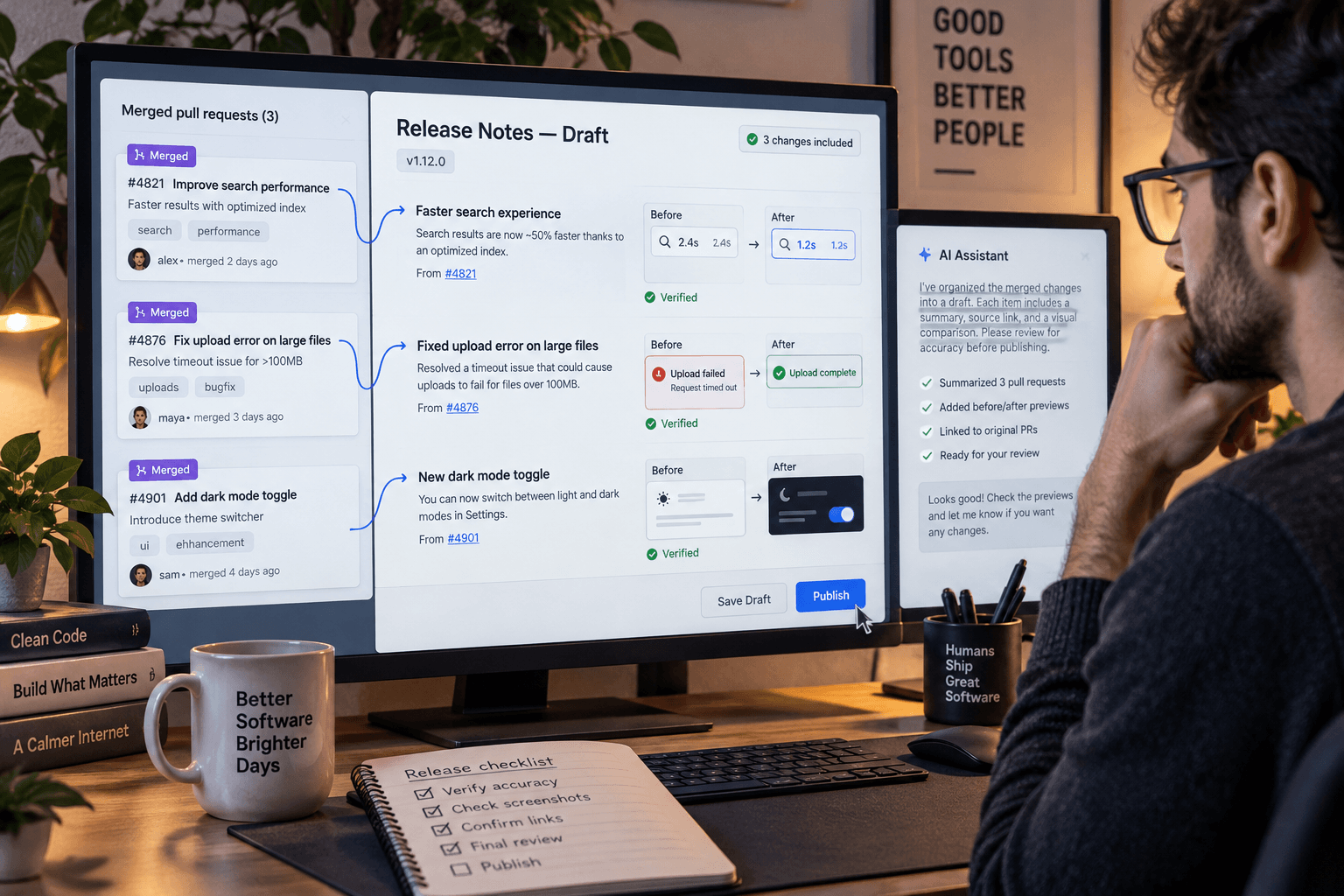
A release can include several small changes that make sense to the people who built them and almost no sense to the people who use the product. A settings label moved. An export now includes a field. A confusing error has a clearer explanation. Someone has to turn those code changes into a short account of what changed for users.
A proposed use for a coding agent is to prepare that first draft from a deliberately selected set of merged pull requests. The result should be a review packet, not an announcement that publishes itself: a plain-language claim, the pull request that supports it, and any question that still needs an answer.
GitHub documents Copilot features for summarizing individual pull requests and explaining their changes using the pull request's files, commits, comments, and reviews. It also documents cloud agent sessions that can work from a prompt or issue and prepare code changes for review. Those are building blocks for working with repository material; GitHub does not describe a built-in feature that automatically turns a batch of merged pull requests into accurate, audience-ready release notes. The multi-change workflow below is a proposal, not a tested recipe. GitHub's guide to exploring pull requests describes the individual-PR features and their context.
Start with a release boundary
First decide which changes belong in the note. Use a release tag, deployment record, or a list maintained by the person who owns the release. Do not ask the agent to infer the release boundary from every recent repository change. A merged pull request may be a refactor, a test, an incomplete feature, or an internal maintenance change that users will never see.
For each selected change, gather the pull request link and title. Include its description and relevant product or support context if that information is approved for the agent you are using. If the note is for customers, specify the product area and audience. If it is for internal support, say which teams need to know and whether the note should mention workarounds or changed procedures.
Keep the task read-only. The agent needs repository and pull request evidence to summarize changes, but it does not need credentials to production systems, customer records, deployment controls, or permission to publish. Use an account and workspace approved for your repository. Available Copilot capabilities depend on plan, client, and organization policy; check your own access before building a process around them. GitHub's task setup documentation describes repository access and the available ways to start a cloud task.
Ask for claims that can be checked
For each selected pull request, ask the agent to return:
- the user-visible change, in plain language;
- the evidence for that description, with the pull request and changed file or line where possible;
- the audience or workflow that may be affected;
- what the code evidence does not establish, such as rollout status, account eligibility, or a changed price; and
- any question that needs a product owner or release owner to answer.
Then ask it to group overlapping changes, remove duplicates, and draft a short note using only claims supported by the selected pull requests and supplied context. Keep references beside each claim, even if you remove them from the final customer-facing copy. Ask it to mark internal implementation details that do not belong in the reader version instead of turning those details into benefits.
A prompt could look like this:
Prepare a draft release note from only the merged pull requests listed below. Do not edit files, open or update pull requests, deploy, publish, or contact anyone. For each possible user-facing change, include the pull request link, the relevant changed file or code reference, a plain-language description, and anything the evidence does not establish. Group duplicate changes. Do not infer availability, customer impact, pricing, or outcomes from a code change alone. If a claim needs confirmation from the release owner, mark it as a question. End with a concise draft and a separate list of claims to verify.
This prompt is illustrative, not tested. If you use a cloud coding agent session, state the no-edit boundary clearly and review the session's actual actions. GitHub says Copilot cloud tasks can be steered and can push code changes; a prompt asking for a draft does not remove the need to check what the tool did. The task guide explains how a cloud session works and how changes can lead to a pull request.
Check the product meaning, not just the summary
A pull request can show that a developer changed code. It may not prove that the change is enabled for users, available on every plan, deployed to production, or useful in the way the draft claims. Check every sentence against the diff and the relevant product behavior. If a claim depends on rollout status, plan eligibility, or a feature flag, ask the release owner or consult the system that actually records that state.
Look especially for language that turns intent into a promise. “Adds an export option” might be supported by a code change. “You can now export all your data” may depend on permissions, rollout, or limits the diff does not establish. “Improves reporting” needs a specific description of what a reader can see or do. If nobody can demonstrate the user-facing result, keep the item out or label what remains unconfirmed.
Copilot can summarize changes, but GitHub cautions that generated explanations and suggestions may be incomplete or inaccurate and should be reviewed. The output is a starting point for finding relevant evidence, not a substitute for checking that evidence. GitHub's responsible-use guidance describes these limits.
If the agent cannot access a listed pull request, do not let it fill the gap from the title. Mark the item as missing and retrieve the approved context yourself. If two changes appear to conflict, preserve the conflict for the release owner instead of asking the agent to choose the more plausible interpretation. If it gives a claim without a reference, remove it until someone can support it.
Keep the release decision with a person
The packet is useful even when some items do not make the final note. A release owner can decide which changes matter to the audience, add context about timing, and remove internal details. A product or support owner can confirm whether a new behavior is available and whether existing guidance needs to change. The person who owns publication approves the final wording and release channel.
There is a fair reason to skip this workflow: a tiny release with one obvious change may take less time to explain directly than to prepare a prompt and check a draft. This approach is more useful when a release contains several changes, the audience is not the development team, and the source evidence can be reviewed without bringing sensitive customer data into the process.
Try it on one small release whose merged changes and user-facing behavior you can verify. Record how many draft claims were accurate, how many required correction or extra context, and how long the agent-assisted review took compared with your usual release-note process. One release will not show whether the method works across every kind of change. If the packet makes claims easier to check, keep it as a preparation step. If it mainly produces polished but unsupported language, narrow the inputs or write the note yourself.
The decision is whether a source-linked draft makes the release easier to explain and verify. The code tells you what changed in the repository; a person still has to establish what changed for the user.
Sources: GitHub's pull request exploration guide, GitHub's Copilot task guide, and GitHub's responsible-use guidance.
Sources
Every claim above traces back to one of these. Go read them yourself.
- 01Using GitHub Copilot to explore pull requests
GitHub Docs / docs.github.com / retrieved Nov 06, 2026
- 02Kick off a task with Copilot agents on GitHub
GitHub Docs / docs.github.com / retrieved Nov 06, 2026
- 03Responsible use of GitHub Copilot Chat
GitHub Docs / docs.github.com / retrieved Nov 06, 2026
Suggested reading
Selected articles based on topic, tags, and skill focus across the library.
Vibecoding News and Updates
VS Code local agent automations get custom schedules
VS Code 1.145 adds custom cron schedules and workspace custom agents to local automations. Check where the task runs and what permissions it has before scheduling it.
Vibecoding News and Updates
October 2026: Coding agents moved into the workflow
October’s coding tools spread across models, IDEs, repositories, and longer-running work. The useful question for November is how you’ll check what they do, not how much code they can produce.
Vibecoding News and Updates
Copilot cloud sessions follow you across clients. Check where the work runs.
GitHub connected Copilot cloud sessions across VS Code, mobile, the CLI, and other clients. Before handing off a task, check whether it runs on GitHub’s cloud or a machine you need to keep online.