
LibraryGit Articles7 min read
Review the workflow the agent actually runs
GitHub Agentic Workflows turns a Markdown request into a GitHub Actions workflow that runs a coding agent. Before enabling one, review the generated workflow and decide which outputs need a person’s approval.
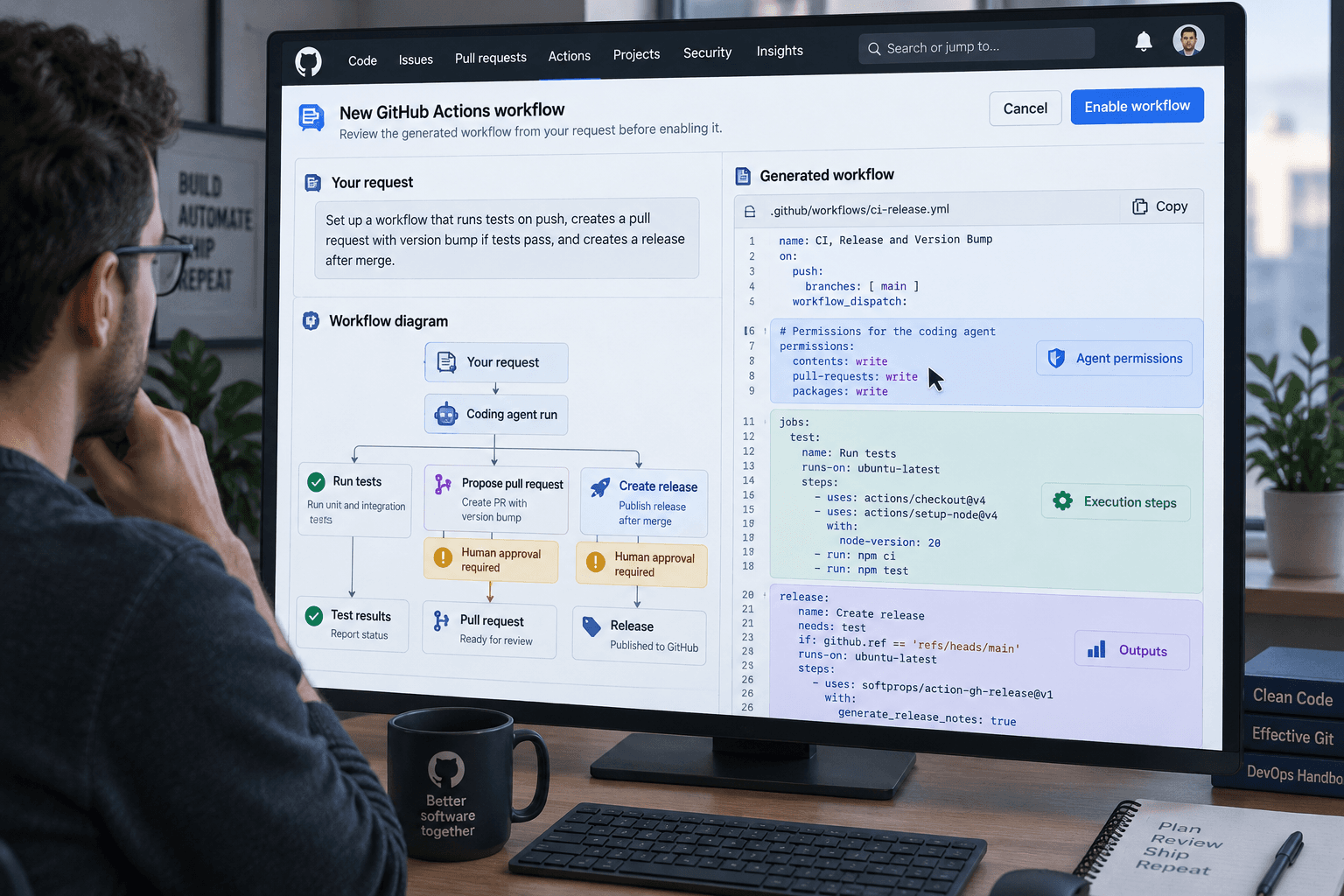
A Markdown file is comfortable to read. That doesn’t mean it’s the whole program. With GitHub Agentic Workflows, a natural-language description is compiled into a GitHub Actions workflow that runs a coding agent. The file you wrote expresses the task. The generated workflow controls what actually runs.
GitHub made Agentic Workflows generally available on October 28 for GitHub Free, Team, and Enterprise. It’s intended for reasoning-heavy repository work such as issue triage, CI failure analysis, documentation updates, and test writing. You can use GitHub Copilot or another supported coding agent. Using the default GitHub Copilot CLI engine requires a Copilot license, even though the workflow feature is available on those GitHub plans. GitHub’s announcement describes the release and what changed since public preview.
The useful question for a team isn’t just “Can the agent do this?” It’s “What will the compiled workflow let it read, run, and write, and who checks that boundary?”
The request and the running workflow are different artifacts
Agentic Workflows uses Markdown to describe the task, then compiles it into standard GitHub Actions YAML. That puts the feature inside a familiar automation system, with existing runner groups and policy constraints. It also means the resulting YAML is part of the system you should review and version.
GitHub Next’s project documentation describes the design and safeguards. Agents have read-only permissions by default, run in a sandboxed container behind the Agent Workflow Firewall, and access GitHub content through integrity filtering. Proposed changes pass through a separate safe-outputs process and a threat-detection job before they’re applied.
Those controls give you useful places to examine the workflow. They don’t establish that its instructions are clear, that the selected data is appropriate, or that every proposed change should be applied. A filter or scan can help reject some risky inputs or outputs. It can’t decide whether a change to your release process is acceptable for your organization.
Treat the Markdown and the generated YAML as a pair during review. The Markdown tells a reviewer what you meant to automate. The YAML shows the Actions jobs and permissions that carry it out. If the two don’t line up, resolve that before enabling the workflow. After a change to the description or its generated result, review the updated pair again.
Start with work that leaves a reviewable result
Choose a task where the agent can prepare something for a person to inspect rather than make a consequential change on its own. For example, it might analyze a failed CI run and draft an issue describing the observed error, or suggest a documentation correction in a pull request. Those are proposals that a maintainer can compare with the source evidence.
Begin in a test repository or a canary branch. Keep the trigger narrow, especially if the workflow runs automatically when someone opens or edits an issue or pull request. Repository content can include text from people who don’t share your security assumptions. A request to ignore instructions or expose information should be treated as untrusted input, even when it appears inside an otherwise ordinary issue.
Before running the workflow, answer a few concrete questions:
- Which repository content can the agent read?
- Which tools, network destinations, or credentials are available to the runner?
- What outputs are declared, and which of them can change repository state?
- Does a person review the result before it can merge, publish, or affect another system?
- How will you disable the workflow and undo a change if it behaves unexpectedly?
If you can’t answer those from the workflow definition and your repository settings, don’t expand its access just to make the first test work. Narrow the task or keep the existing manual process while you investigate.
Make the write boundary explicit
Read-only access is a useful default for an agent that needs to inspect code, logs, or issues. Many useful tasks still need to produce an output. The distinction is between letting the agent propose a specific result and giving it broad permission to apply arbitrary changes.
Safe outputs are designed to validate proposed changes and apply only declared types of output with separate permissions. Inspect which outputs your workflow permits. If it can open a pull request, add a label, or post a comment, each action has a different effect and should be considered on its own. A pull request is reviewable; a public comment is already visible; a change to a release workflow can alter future deployments. Don’t treat them as equivalent just because they’re all “outputs.”
For changes with a larger consequence, keep a named person in the decision. A documentation suggestion might be safe to review as a normal pull request. A change to credentials, access rules, dependency policy, or deployment configuration may deserve an explicit approval step before it merges or takes effect. The right line depends on the repository and the work. The point is to set it before the agent runs, not after a useful-looking result appears.
The strongest argument for adopting this is that routine repository work often waits on a maintainer’s attention. An agent that can continuously inspect failures, propose tests, or keep documentation current could make that work easier to notice and review. GitHub has published examples and customer productivity claims, but those don’t show that your repository will get the same results. The task, existing test coverage, quality of the inputs, and reviewer time all matter.
Budget and hosting are part of the choice
The October 28 release added a more complete budget forecast command, gh aw forecast, including threat-detection credits and monthly ranges. GitHub also lists selectable model providers, model routing, and stronger isolation options such as Cloud Hypervisor or NVX micro-VMs. Support for Actions Runner Controller and Docker-in-Docker on self-hosted runners is another part of the general-availability release.
These options make the system more configurable. They don’t make cost or operations disappear. Check the forecast for the workflow you plan to run, and consider how often its trigger fires, which model it uses, and whether threat detection adds usage. A self-hosted runner can bring the job into infrastructure you manage, but then your team owns the runner’s configuration, maintenance, and access boundaries too. Don’t assume that “self-hosted” automatically means less work or lower total cost.
There’s also a reasonable case for keeping ordinary Actions or a human checklist. If a task follows predictable rules, an existing workflow may be easier to test and less expensive to maintain. If it happens once a month, automating it may not recover the time required to configure, review, and monitor an agent. Use the agentic approach when the work needs judgment and the result can still be checked against evidence.
A bounded way to evaluate it
Pick one low-consequence task in a non-production repository. Write down what a correct result looks like and what the agent must not change. Use a narrow trigger and read-only access first. Compile the workflow, review the generated YAML and its permissions, then run it on a small set of real examples that includes an awkward or hostile input, not just the happy path.
Compare each proposed output with the underlying issue, log, test, or code. Record false alarms, missed cases, corrections, run cost, and the time a reviewer spent. If the workflow needs more access to succeed, decide whether that access is genuinely required and how it will be constrained. If the output can affect customers, deployments, or access, keep the appropriate approval gate.
Move beyond the test only if the result is useful and the review burden is acceptable. Otherwise, keep the current process. General availability means the feature is broadly available; it doesn’t make an individual workflow dependable by default. The generated workflow is the part that runs, so review that artifact before you trust the Markdown request.
Sources
Every claim above traces back to one of these. Go read them yourself.
- 01GitHub Agentic Workflows generally available
GitHub Changelog / github.blog / retrieved Nov 02, 2026
- 02GitHub Agentic Workflows documentation
GitHub Next / github.github.com / retrieved Nov 02, 2026
Suggested reading
Selected articles based on topic, tags, and skill focus across the library.
Git Articles
GitHub Actions will block pull_request_target by default on December 2
GitHub plans to enforce a default block for pull_request_target in affected public repositories on December 2. Check which workflows rely on it before then.
Vibecoding News and Updates
Turn merged pull requests into a release note draft
A coding agent can help turn a selected set of merged changes into a release note draft. Keep the source links, verify what users will notice, and leave publication with a person.
Vibecoding News and Updates
VS Code local agent automations get custom schedules
VS Code 1.145 adds custom cron schedules and workspace custom agents to local automations. Check where the task runs and what permissions it has before scheduling it.