
LibraryVibecoding News and Updates6 min read
Ask an agent to check whether the docs still match a pull request
A coding agent can compare one pull request with the documentation it may affect. Ask for a source-linked review packet, then decide what actually needs to change.
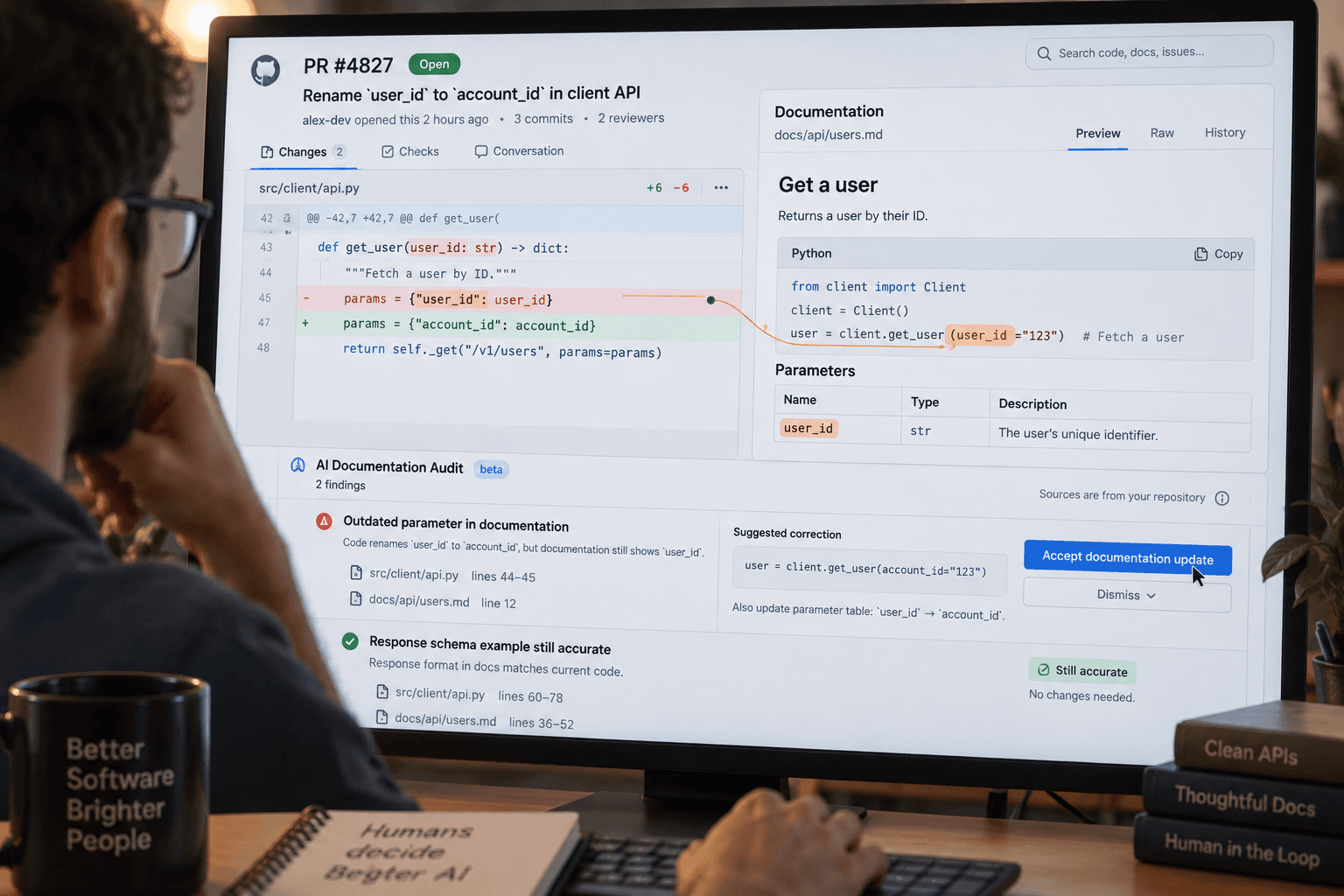
A small code change can leave a surprisingly large trail behind it. A setting moves, a permission check changes, or a button gets a new outcome. The code may be right while the setup guide still tells the next person to do the old thing.
A proposed use for a coding agent is to compare one pull request with the documentation that could describe its behavior. The goal is a short review packet: what might have changed, where the code supports that reading, which pages may need attention, and what remains uncertain. The agent prepares evidence for review. It does not decide what the product should do or rewrite the docs on its own.
Start with one pull request and one behavior
Choose a small pull request that changes something a reader or operator could notice. Good candidates include a renamed setting, a changed permission boundary, a new setup step, or an altered error response. Avoid starting with a broad refactor whose effect is unclear even to the people who wrote it.
The input is the pull request description and diff, the relevant code around the change, and the documentation in the same repository that might explain that behavior. Keep the task to the pull request under review. Don’t ask the agent to audit every page, infer the product roadmap, or determine whether the change itself is correct.
Codex’s Code Review guidance describes reviewing a pull request’s description, changed files, comments, checks, and findings, then asking Codex about a specific behavior or finding. It also says generated findings should be checked against the relevant code before relying on them. That makes a focused question about documentation a reasonable proposed use of the review flow, not a documented promise that Codex will find every documentation gap. OpenAI’s pull-request review guide explains the review steps and limits.
Ask for evidence, not an edit
Give the agent a boundary and a clear output shape. For example:
Compare this pull request’s behavior changes with the repository documentation that could describe them. Focus only on this pull request. Do not edit files, post comments, run deployments, or merge anything. For each possible documentation gap, list: the behavior the pull request changes; the relevant code path and line or symbol; the documentation path and passage; whether the docs appear to match, may be stale, or are unclear; and the evidence that supports that assessment. Quote only short passages. If you cannot establish the behavior or find relevant documentation, say so. Do not propose a product decision.
This prompt is an illustrative starting point, not a tested recipe. Adapt it to how your team names its docs and code. If the change affects permissions, ask the agent to distinguish what the code allows from what the documentation says a user should do. If it changes a default, ask it to identify the old and new values only when the diff or tests establish them.
The intended result is a small table or list, not replacement documentation. A useful row might say: “The pull request changes who can export a report; the permission check is in reports/export.ts; the admin guide still says all editors can export; review needed.” The exact paths and conclusion would need to come from the repository. Don’t accept a polished summary without those references.
Check each finding against the work
The pull request author’s description gives context, but the diff and surrounding code show what actually changed. Open the referenced code. Check whether the cited condition is the one that runs, whether another layer changes the outcome, and whether tests or existing behavior clarify the result. If the agent cites a test, inspect what that test asserts. A passing check does not establish that the documentation is accurate.
Then open the documentation passage it flagged. It may be correct for another version, role, or setup path. It may describe a broader policy than the code change. Or it may be genuinely out of date. Ask the code owner or documentation owner when that distinction depends on intended behavior rather than what the current implementation does.
Codex’s review guidance supports asking follow-up questions such as where a finding is supported in the code, but it puts review of those findings with the person using them. Repository access matters too: OpenAI says the account’s repository permissions determine what the reviewer can read or change, and a managed workspace may require the Code Review plugin and an app connection. The tool’s presence does not create repository access. The same guide describes those access conditions.
If you use Codex Cloud for a repository task instead of the Code Review interface, check its setup separately. OpenAI describes cloud tasks as running in an isolated workspace with separate working files; you still need a prepared environment and repository access, and the guidance says to review the changes and test results before using them. OpenAI’s Codex Cloud guide covers that environment and its constraints. Don’t assume the Code Review and cloud-task experiences share every permission or capability.
Recover cleanly when the answer is weak
If the agent cannot find relevant docs, don’t treat that as proof no docs exist. Name the documentation directories or the known page, then ask it to compare those specific files. If it can’t trace the behavior, narrow the question to one changed function or setting. If code and docs appear to conflict, retain both references and mark the intended behavior unresolved; don’t instruct the agent to choose the more plausible one.
If you realize the request was too broad, stop and restart with one behavior and one likely documentation area. Keep the original pull request as the boundary. If the output includes claims without paths or code evidence, ask for support or discard those claims. Don’t paste private customer records or secrets into a review task; the workflow needs repository evidence, not production data.
Once a person confirms a real gap, make the documentation change through the normal review process. The agent can help draft wording if asked, but keep that as a separate, explicitly scoped task. Review the proposed text against the intended behavior and check the resulting diff before merging. The first request should help you decide whether an edit is needed, not silently turn a reviewer into a publisher.
Decide whether the check earns its place
Try this on a low-consequence pull request whose behavior you can verify. Record how many findings were accurate, how many useful gaps it surfaced, and how much time the check and follow-up took. One example won’t show that the workflow catches every kind of drift. If it returns vague matches, misses the relevant docs, or takes longer to verify than a person’s usual review, tighten the scope or leave the check out of that pull request process.
The decision is whether a source-linked documentation check helps your reviewers notice changes they would otherwise miss. If it does, keep it as a review aid with a person responsible for confirming the behavior and approving edits. If it doesn’t, the pull request’s own author and reviewer remain responsible for checking whether the docs still tell the truth.
Sources: OpenAI’s pull-request review guide and OpenAI’s Codex Cloud guide.
Sources
Every claim above traces back to one of these. Go read them yourself.
- 01Review pull requests with Codex
OpenAI Help Center / help.openai.com / retrieved Nov 02, 2026
- 02Using Codex Cloud
OpenAI Help Center / help-lb.openai.com / retrieved Nov 02, 2026
Suggested reading
Selected articles based on topic, tags, and skill focus across the library.
Vibecoding News and Updates
Turn merged pull requests into a release note draft
A coding agent can help turn a selected set of merged changes into a release note draft. Keep the source links, verify what users will notice, and leave publication with a person.
Vibecoding News and Updates
VS Code local agent automations get custom schedules
VS Code 1.145 adds custom cron schedules and workspace custom agents to local automations. Check where the task runs and what permissions it has before scheduling it.
Vibecoding News and Updates
October 2026: Coding agents moved into the workflow
October’s coding tools spread across models, IDEs, repositories, and longer-running work. The useful question for November is how you’ll check what they do, not how much code they can produce.