LibraryThe daily read11 min read
Your spreadsheet just got a front end
A twelve-person team pays about $2,880 a year for a tool whose actual job is putting a usable view on data that already lives in a spreadsheet. Google now builds that view from one sentence and writes changes back to the sheet, and it fixes none of the reasons the spreadsheet was a bad system of record.
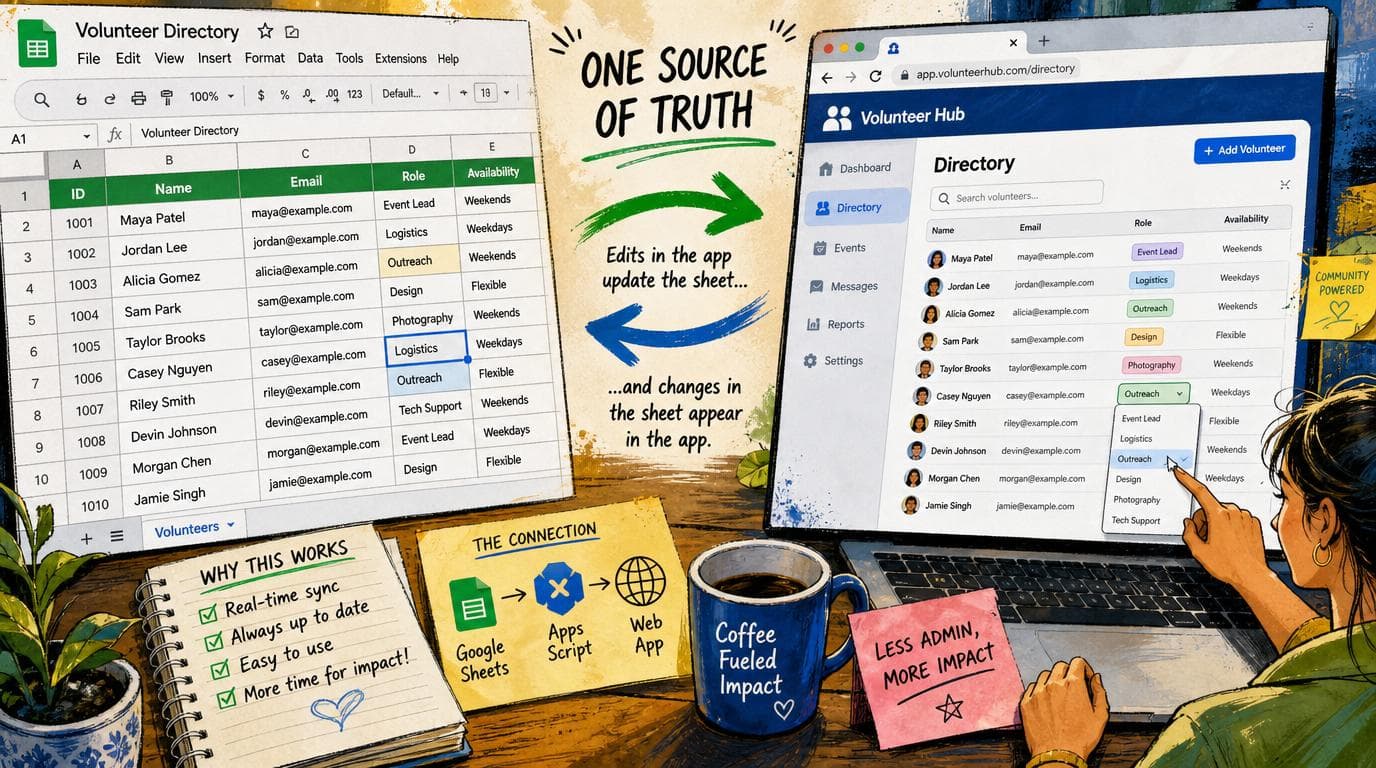
The ops lead at a forty-person distributor keeps the install schedule in a Google Sheet, and about four people in that building will ever open it. Everybody else texts that person for updates, which is why that person's afternoon is gone. The standing fix is to buy something with a friendlier face on it, and for a twelve-seat team Airtable's Team plan is $20 a seat a month billed annually, roughly $2,880 a year, plus the weekend somebody spends migrating and the six months where half the company still works out of the old sheet anyway. As of Thursday that ops lead can type one sentence into the Gemini panel of the sheet they already have and get a drag-and-drop board sitting on top of it, where moving a card moves the row. Google shipped it as Sheets canvas, and the part that matters is not that it draws a dashboard. Sheets has drawn dashboards for a decade. It is that this one writes back.
What actually changed
Google announced Sheets canvas on the Workspace Updates blog on Thursday, August 13. You open a spreadsheet, open the Gemini side panel, and describe the thing you want. Google's own examples are a Kanban board grouped by workflow stage, a financial dashboard with scenario planning, and a whiteboard with sticky notes. It generates the interface from the prompt, with no formulas, no scripts, and no third-party tool in the loop.
Two details do the real work. The first is that it is fully read-write in both directions. Drag a task card into a new column and the source sheet updates. Add an entry in the canvas and a row appears. Change the sheet directly and the canvas reflects it in real time. The second is that you can keep prompting to adjust it: layout, design, and functionality, after the fact, without starting over.
The rest of the announcement is the fine print, and it is worth reading closely because most of it is a constraint. It is web only and English only. It requires Workspace smart features to be turned on. Creating and editing canvases is subject to per-user usage limits that Google does not put a number on in the post. Availability is Business Standard and Plus, Enterprise Standard and Plus, Google AI Pro and Ultra, the education add-ons, and the AI Expanded Access add-on. Business Starter is not on the list, and neither is any tier that lacks Gemini in Sheets. And sharing, in Google's own words, works because the canvas "inherits the same sharing settings as your spreadsheet." Hold on to that sentence. We will come back to it.
The problem this actually solves, which is not the one people name
Ask a twenty to two hundred person business why they are shopping for a project tracker, an inventory tool, or a lightweight CRM, and you will get an answer about the spreadsheet: it is getting unwieldy, it is getting slow, it is getting messy. Watch what they actually do for a week and the story is different. The data is fine. Twelve thousand rows is nothing. The formulas work. The file opens.
The problem is that a spreadsheet is a terrible interface for anyone who does not already think in spreadsheets, and most of your company does not. The dispatcher will not scroll horizontally to column AJ. The field tech will not update a status by clicking into a cell that has a data validation dropdown on it. The account manager will not touch anything, because they touched something once in 2023 and broke a formula and got yelled at. So all of the work funnels back through the one or two people who are fluent, and those people become a bottleneck that looks exactly like a software problem and is not one.
That is what the $20 a seat buys. Not a database. Airtable, Smartsheet, and monday.com are all sitting on top of a table that a spreadsheet could have held, and what a small business is actually paying for is a view that the other eleven people will touch without fear. It is a real thing to pay for. It just was never the thing on the invoice.
Sheets canvas aims directly at that gap and at nothing else. It does not move your data. It does not ask anyone to learn a new tool. It puts a board or a tracker or a dashboard on the file that is already the source of truth, which means the migration cost is zero and the "half the company is still on the old sheet" problem cannot happen, because the old sheet is the new thing.
For the practitioner reader, the RevOps or marketing-ops person who has been building around this for years, the displaced cost is a different one and it is bigger. The internal request that never gets approved is "can we get a simple view of this for the sales team." It is not big enough to be a project and not small enough to do in an afternoon, so it sits in a backlog forever, and the workaround is a Looker Studio dashboard that reads and does not write, or a Retool build that requires a real login and a real budget line. A read-write interface generated from a sentence is not a better version of those. It is a different category of thing: it costs nothing to try, it costs nothing to throw away, and nobody has to approve it. The first time you can build a thing and delete it the same day, you start building things you would never have filed a ticket for.
Where the money actually moves
Be careful about the arithmetic here, because the obvious version of it is wrong.
Nobody who is happily running on Airtable today is going to cancel because of this. The switching cost of leaving a tool your team already learned is almost always higher than the subscription, and it is paid in the worst possible currency, which is your own people's hours. That math does not change.
What changes is the purchase you were about to make. The next tracker. The next "we need something for this" conversation that was heading toward a demo and a fourteen-day trial. That is where the $2,880 a year stops leaving the building, and for a business with three or four of those subscriptions accumulated over five years, the compounding is the story rather than any single line.
The cost of admission is worth naming honestly. Gemini in Sheets is not on Business Starter, which runs $7 a user a month on annual billing. Business Standard is $14. So if you are on Starter, this feature costs you $84 a user a year to reach, which for a twelve-person team is $1,008. Against $2,880 for the Airtable seats it still wins, and you get 2 TB per user and Meet recording thrown in, but it is not free and anybody telling you it is has not looked at your bill. If you are already on Standard or Plus, which most Workspace customers of this size are, then it costs nothing and it is already on the way to you.
The honest take
Start with the sharing line, because it is the one that will actually hurt somebody.
The canvas inherits the spreadsheet's sharing settings. That is written as a convenience and it is a real constraint. It means you cannot hand somebody the Kanban board without also handing them the spreadsheet underneath it, in full, including the tab with margins on it, including the column with the pay rates, including whatever somebody pasted into row 400 in 2024 and forgot about. Per-view and per-field permissions are a substantial part of what a per-seat tool charges for, and this does not replicate them. If your instinct is to build a nice board and share it with a subcontractor, or a client, or the part-time person who covers Saturdays, go read your own sheet top to bottom first. That is a five minute job and the alternative is a conversation you will remember.
Second, and this is the structural one: it is a view, not a system. The spreadsheet is still the database. Every reason a spreadsheet is a fragile system of record survives this release completely untouched. There is still no field-level validation you can rely on, no row-level permissions, no referential integrity, and no audit trail beyond version history that nobody reads. Two people can still both be right about the same number at the same time, and now the version of that problem you have is worse, because the people creating the conflict are people who never opened the sheet and have no idea what they are editing when they drag a card. A prettier interface on a shaky foundation increases traffic on the foundation. That is the whole risk in one sentence, and it is the thing to watch in month three.
Third, most of you do not have this yet and will not for weeks. Rapid Release domains started getting it on August 10. Scheduled Release starts no sooner than August 31 and then rolls out gradually for up to fifteen days after that, so mid-September is a realistic date. And Scheduled Release is the default track for a Workspace domain, so unless somebody at your company deliberately switched it, that is you. Do not plan around this in August.
Fourth, if you are in the EEA, the UK, Switzerland, or Japan, Workspace smart features are off by default in those regions, because Google's legal basis for them there is user consent rather than the terms you already signed. The feature will simply not appear until a super administrator or the user turns the setting on, and a lot of people will spend an afternoon looking for a button that a privacy regulation moved.
Fifth, web only, English only, and no mobile. Read that against the pitch. The entire argument for this feature is the person who will not open a spreadsheet, and a meaningful share of those people are the ones in a truck, on a phone, between jobs. iOS and Android are not mentioned. Until they are, this improves the office, not the field, and for a trades business that is most of the value sitting on the other side of the gap.
And then the part that should temper everybody's confidence: Google has already shipped a no-code app builder that sits on top of Google Sheets. It is called AppSheet, it has been around for years, it is included on every Workspace tier including the $7 one, and almost nobody at a small business uses it. The capability was never the missing piece. The missing piece was that building the app was work, and the person who had the problem was not going to sit down and do that work on a Tuesday. A prompt genuinely collapses that, which is why this is worth writing about at all. But a second app builder shipping on the same substrate is also a data point about how the first one went, and the honest position is that generating an interface in ten seconds is a real change to the effort curve and an unproven change to the adoption curve. Those are different problems and the industry keeps solving the first one and announcing the second.
One thing nobody knows yet, including Google as far as the announcement says: what happens to a canvas when the sheet underneath it changes shape. Somebody inserts a column, renames a header, adds a tab. Generated interfaces are bound to the structure they were generated against, and spreadsheets in a working business change structure constantly. If you build one of these and it matters, break it on purpose in week one and see what happens, before you find out in week nine with the whole team depending on it.
For fifteen years the answer to a spreadsheet that had outgrown itself was to go buy a real system, and most small businesses either paid for one they never fully moved onto or stayed put and felt bad about it. Google just put a third option on the table, which is to leave the spreadsheet exactly where it is and stop making people look at it. Whether that works for you depends entirely on a question you have probably never asked out loud: was the problem ever the file, or was it always the eleven people who refused to open it?
Sources
Every claim above traces back to one of these. Go read them yourself.
- 01Use Sheets canvas to visualize data in custom, interactive mini-apps
Google Workspace Updates / workspaceupdates.googleblog.com / retrieved Aug 14, 2026
- 02Compare Google Workspace pricing plans
Google / workspace.google.com / retrieved Aug 14, 2026
- 03Airtable pricing
Airtable / airtable.com / retrieved Aug 14, 2026
- 04Choose when users get new features
Google Workspace Admin Help / support.google.com / retrieved Aug 14, 2026
- 05Learn about smart features and controls for Google Workspace
Google / support.google.com / retrieved Aug 14, 2026
- 06AppSheet: build apps without code
Google / workspace.google.com / retrieved Aug 14, 2026
Related reading
Nearest neighbours by meaning, drawn from the whole library rather than from matching tags. Some of these are from a different series on purpose.
The daily read
The mark that survives the paste
Every Claude model launched since August 2 weaves an invisible watermark into the text it generates, worldwide, and it travels when the text is copied and pasted. The detector that reads it has not shipped yet, which means for now the mark is a liability you carry and not a check you can run.
The daily read
Your required fields were never required
The required field you configured in HubSpot has been optional for every robot pointed at your CRM: the AI agent, the nightly script, the Zap nobody owns. HubSpot said on Tuesday that changes with the September API version, and the part worth reading twice is that it changes on your schedule, not theirs.
The daily read
The agent can live in your building now
Meta released a 30-billion-parameter agent model on Monday under Apache 2.0 that runs the whole tool-calling loop on one desktop machine, offline. The bill it displaces is not the chat subscription. It is the loop bill, and the compliance answer that killed the project before it started.