

LibraryFoundational AI: Do's and Don'ts4 min read
Let AI prepare a HubSpot forecast, then submit it yourself
HubSpot’s MCP server can help an AI analyze CRM records, but its documented tools don’t include forecast submissions. Use it to prepare a reviewable draft and keep the final number in HubSpot’s Forecast tool.
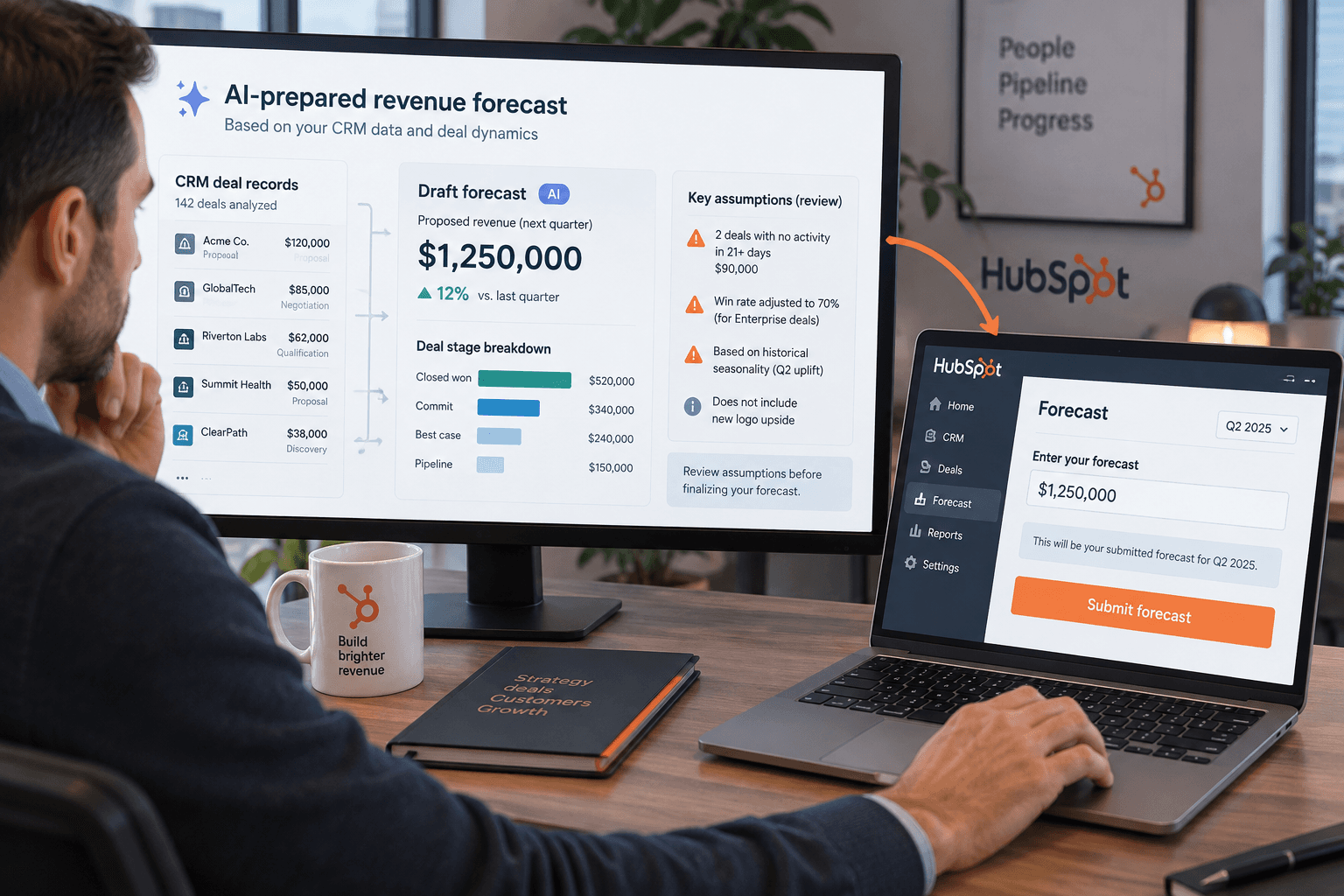
An AI sales agent can help assemble a forecast, but HubSpot’s documented Remote MCP server doesn’t currently list tools for reading or submitting forecast submissions. HubSpot does document a separate Forecasts API for reading them. For now, plan on a handoff: let AI prepare an estimate and its reasoning, then have an authorized person review and submit it in HubSpot.
That’s the practical answer to a HubSpot Community question posted October 26. The user is moving an AI sales workflow from direct API calls to MCP and asks how to access and submit forecasts. The gap is real in the current documentation, but it doesn’t mean you have to abandon AI-assisted analysis.
Separate the analysis from the submission
HubSpot’s Remote MCP documentation lists supported CRM records and activities. Forecast submissions aren’t among the documented data types or write actions. The Forecasts API is a separate route: HubSpot describes it as generally available and read-only, with endpoints for submissions, submission history, and forecast types. HubSpot lists availability for Sales Hub and Service Hub Professional and Enterprise, with the crm.objects.forecasts.read scope.
That gives a team two different possibilities. An MCP-connected AI can use the CRM records its user is allowed to access to help review deals. A separate integration using the Forecasts API can read forecast submissions for eligible accounts. Neither documented path lets the model write a forecast submission through MCP. HubSpot’s Forecast tool instructions describe submitting in the HubSpot interface, where the user selects the pipeline and period, enters an amount and note, reviews prior submissions, and submits.
Make the AI output a draft someone can check
Keep the task bounded. Ask for a proposed forecast and the evidence behind it, not a final number to copy without review. For example, the request could be:
For the selected pipeline and quarter, prepare a draft forecast from the deal records I can access. Show the deal name, amount, close date, stage, owner, and the source fields used. Separate confirmed deal facts from assumptions. Flag missing or conflicting information. Give me a proposed total and explain which assumptions change it most. Do not update HubSpot or submit a forecast.
The exact fields depend on your process. The important part is that the draft preserves the difference between CRM data and judgment. A deal’s amount and close date are recorded values; whether it will close in the period is an estimate. If your team uses probability weights, categories, or other rules, provide the approved definitions and ask the system to show how it applied them. Don’t let it invent a forecasting policy to fill a gap.
Before anyone enters a number, check that the output uses the correct pipeline, forecast period, currency, and accessible set of deals. Confirm the data is current, investigate missing or duplicated records, and compare the estimate with the actual forecast rules your team uses. If you have the Forecasts API and the required plan, prior submissions can provide history for comparison, but they do not prove the new estimate is right.
Then open Sales > Forecast in HubSpot. Review the period and pipeline, enter the amount and note, and submit only after the person responsible for that forecast agrees with the number. HubSpot’s own instructions describe this interface flow; keep the UI step with the authorized owner.
Stop where the evidence stops
An AI-generated total is not a submitted forecast, and a read API does not make it one. If your workflow requires the model to write forecast submissions automatically, the current documentation doesn’t support that design. Keep the submission manual, or wait until HubSpot documents a supported write path and your team has reviewed its permissions and controls.
For a first trial, use a small group of deals and compare the draft with the team’s existing forecast process. Check whether the evidence is complete and whether the assumptions are useful. If the output can’t show where its estimate came from, stop before entering it. The useful division of work is straightforward: AI can organize evidence and prepare a proposed view; the forecast owner decides what the business will submit.
Sources: the public question, HubSpot’s Remote MCP documentation, HubSpot’s Forecasts API announcement, and the Forecast tool guide.
Sources
Every claim above traces back to one of these. Go read them yourself.
- 01Support for Forecast Submissions in the Remote MCP Server (Read & Write)
HubSpot Community / community.hubspot.com / retrieved Oct 27, 2026
- 02Integrate AI tools with the HubSpot MCP server
HubSpot Developers / developers.hubspot.com / retrieved Oct 27, 2026
- 03Fall 2026 Spotlight: Forecasts API
HubSpot Developers / developers.hubspot.com / retrieved Oct 27, 2026
- 04Use the forecast tool
HubSpot Knowledge Base / knowledge.hubspot.com / retrieved Oct 27, 2026
Suggested reading
Selected articles based on topic, tags, and skill focus across the library.
Foundational AI: Do's and Don'ts
Audit HubSpot Customer Agent conversations, not just its score
HubSpot’s Customer Agent reports can show volume, resolution, handoffs, and coaching opportunities. Pair those metrics with a small, consistent review of actual conversations to judge answer quality.
Foundational AI: Do's and Don'ts
Make a decision table before asking AI to apply a rule
When a work rule depends on several conditions, map the combinations and their outcomes before asking AI to apply it. The table can expose gaps your prompt would otherwise hide.
Foundational AI: Do's and Don'ts
Separate what someone did from why you think they did it
AI can turn a late reply or missed deadline into a confident story about someone's intent. Keep the observed behavior separate from the explanation before it shapes a business decision.