

LibraryFoundational AI: Do's and Don'ts5 min read
Audit HubSpot Customer Agent conversations, not just its score
HubSpot’s Customer Agent reports can show volume, resolution, handoffs, and coaching opportunities. Pair those metrics with a small, consistent review of actual conversations to judge answer quality.
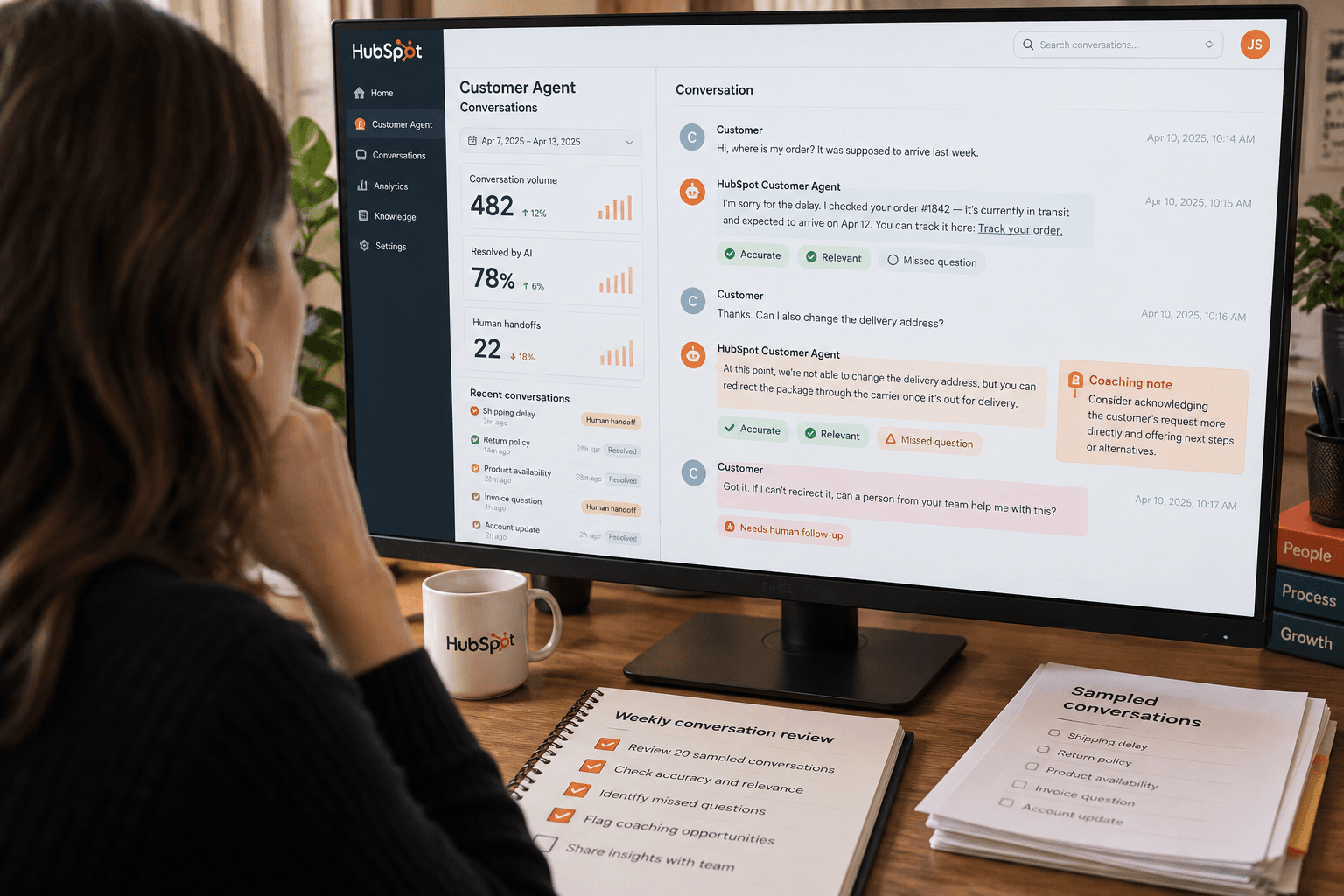
A Customer Agent can show a healthy resolution rate while giving some customers the wrong answer. The dashboard tells you what happened by HubSpot’s definitions. Reviewing conversations tells you whether the outcome was actually good for the customer.
A HubSpot Community user asked how to audit the Customer Agent’s content and quality, which measures to use, and how to review conversations. The useful answer is to use both the built-in reports and a small, repeatable sample of the underlying conversations. The question was posted in the HubSpot Community on November 5.
Start with the reports, but read the definitions
In HubSpot, open Service > Customer Agent > Analyze > Reports. The reports include conversations handled over time and by channel, visitor feedback, resolutions, deflections, human handoffs, and coaching opportunities. The Source Usage tab also shows how often content sources are used and their associated resolution rate. HubSpot documents these reports in its Customer Agent performance guide.
Before using a number to judge quality, check how it is counted. HubSpot counts a conversation as resolved if a Customer Agent reply shares a content source or performs an action and there is no qualifying visitor-initiated handoff within 72 hours of the visitor’s last response. A lead marked qualified, partially qualified, or not qualified also counts as resolved. A manual assignment to a human, including one made through a workflow, is included in the human handoff report but does not by itself count as a qualifying handoff for resolution metrics.
That difference matters. Resolution rate is not a simple measure of whether every customer’s issue was solved to their satisfaction. Deflection is not the same as resolution either: HubSpot says a customer can leave without human help even when the agent did not answer the question. Reply-based resolutions also have a 72-hour evaluation delay, so current-week data can lag.
Use these figures to spot patterns and choose what to inspect. Don’t use a high resolution or deflection rate as a substitute for checking whether answers were accurate and appropriate.
Review conversations with the same rubric
Choose a consistent review window, such as the previous week, and capture the date range and channels you included. Then select a manageable set of conversations. A useful starting point is to include a mix of resolved conversations, handoffs, negative visitor feedback, and coaching opportunities. If you review only the most obvious failures, you won’t learn whether ordinary answers are reliable. If you review only resolved conversations, you can miss where the agent handed work to a person.
For each conversation, check five things:
- Correctness: Does the answer match the customer’s question and the available source or record?
- Completeness: Did it include the detail needed to answer, or ask a useful follow-up when information was missing?
- Source fit: Does the cited or used knowledge actually support the answer, and is it current?
- Action and boundary: If the agent took an action, did it do the right thing? Did it stay within the instructions and permissions you intended?
- Handoff: Was a person brought in when needed, and did the handoff give them enough context to continue?
Mark each item as pass, issue, or not applicable, and add a short note pointing to the message or source that explains the rating. This is a suggested review rubric, not a HubSpot score or a tested standard. Keep the rating tied to evidence in the conversation rather than to how confident or polished the response sounds.
For example, a reply may accurately quote a return policy but omit that it applies only within a particular time window. The source exists and the conversation might not count as a handoff, yet the answer still needs review. Record the issue as an incomplete answer, note the policy passage, and check whether the source or agent instructions made the limit clear.
Turn a pattern into one change you can check
HubSpot’s coaching opportunities group potential issues such as knowledge gaps, conflicting sources, handoff problems, and action issues. You can open an opportunity to review the related conversation and take coaching actions. The Source Usage report also links sources to conversations. Those features can help narrow the review, but a reported opportunity is a lead to inspect, not proof that the source or agent caused the problem.
If you use topic reports, HubSpot lets you inspect topics and coaching opportunities in the Customer Agent workspace. Topic data may take time to appear, and some conversations are not assigned a topic, including very recent or unreadable ones. A conversation can also be associated with more than one topic; default topic reporting counts it once under its primary topic. HubSpot’s topic documentation explains these limits.
After reviewing the sample, group issues by what needs attention: knowledge content, an action the agent can or cannot take, its handoff guidance, or the customer experience. Pick one recurring, well-supported issue and make one change. Then use a later sample from a comparable channel and date range to see whether that issue appeared less often and whether a different problem showed up.
Keep the sample size, selected conversations, rubric, and change in a simple review log. It lets another person understand what you inspected and compare periods without treating a small sample as a company-wide quality score. If you see too few cases of a particular type to draw a conclusion, record that instead of turning a handful of conversations into a trend.
Decide what the metric can support
Customer Agent performance reports require an eligible HubSpot subscription and HubSpot Credits, according to HubSpot’s documentation. Available reports and features can vary by account. If you don’t see a report or coaching option, check the current subscription, permissions, and product documentation for your portal before assuming the feature is missing or that another audit tool is required.
The dashboard is useful for monitoring volume and finding conversations to inspect. It does not tell you, on its own, whether the customer got a correct answer, whether an agent action was appropriate, or whether the handoff worked for your team. Pair the metric with a consistent conversation review, make one evidence-based improvement, then check whether the same type of case improved. If you cannot access enough examples or verify the source behind an answer, keep the conclusion narrow and bring the uncertain cases to the person who owns the service process.
Sources: HubSpot Community question, Customer Agent performance reports, and topic analysis guidance.
Sources
Every claim above traces back to one of these. Go read them yourself.
- 01AI Customer Agent - auditing performance and quality
HubSpot Community / community.hubspot.com / retrieved Nov 06, 2026
- 02Analyze customer agent's performance
HubSpot Knowledge Base / knowledge.hubspot.com / retrieved Nov 06, 2026
- 03Use topics to analyze customer interactions
HubSpot Knowledge Base / knowledge.hubspot.com / retrieved Nov 06, 2026
Suggested reading
Selected articles based on topic, tags, and skill focus across the library.
Foundational AI: Do's and Don'ts
Let AI prepare a HubSpot forecast, then submit it yourself
HubSpot’s MCP server can help an AI analyze CRM records, but its documented tools don’t include forecast submissions. Use it to prepare a reviewable draft and keep the final number in HubSpot’s Forecast tool.
Foundational AI: Do's and Don'ts
Make a decision table before asking AI to apply a rule
When a work rule depends on several conditions, map the combinations and their outcomes before asking AI to apply it. The table can expose gaps your prompt would otherwise hide.
Foundational AI: Do's and Don'ts
Separate what someone did from why you think they did it
AI can turn a late reply or missed deadline into a confident story about someone's intent. Keep the observed behavior separate from the explanation before it shapes a business decision.