

LibraryVibecoding News and Updates10 min read
Xojo’s Agentic Mode gives coding agents a compiler feedback loop
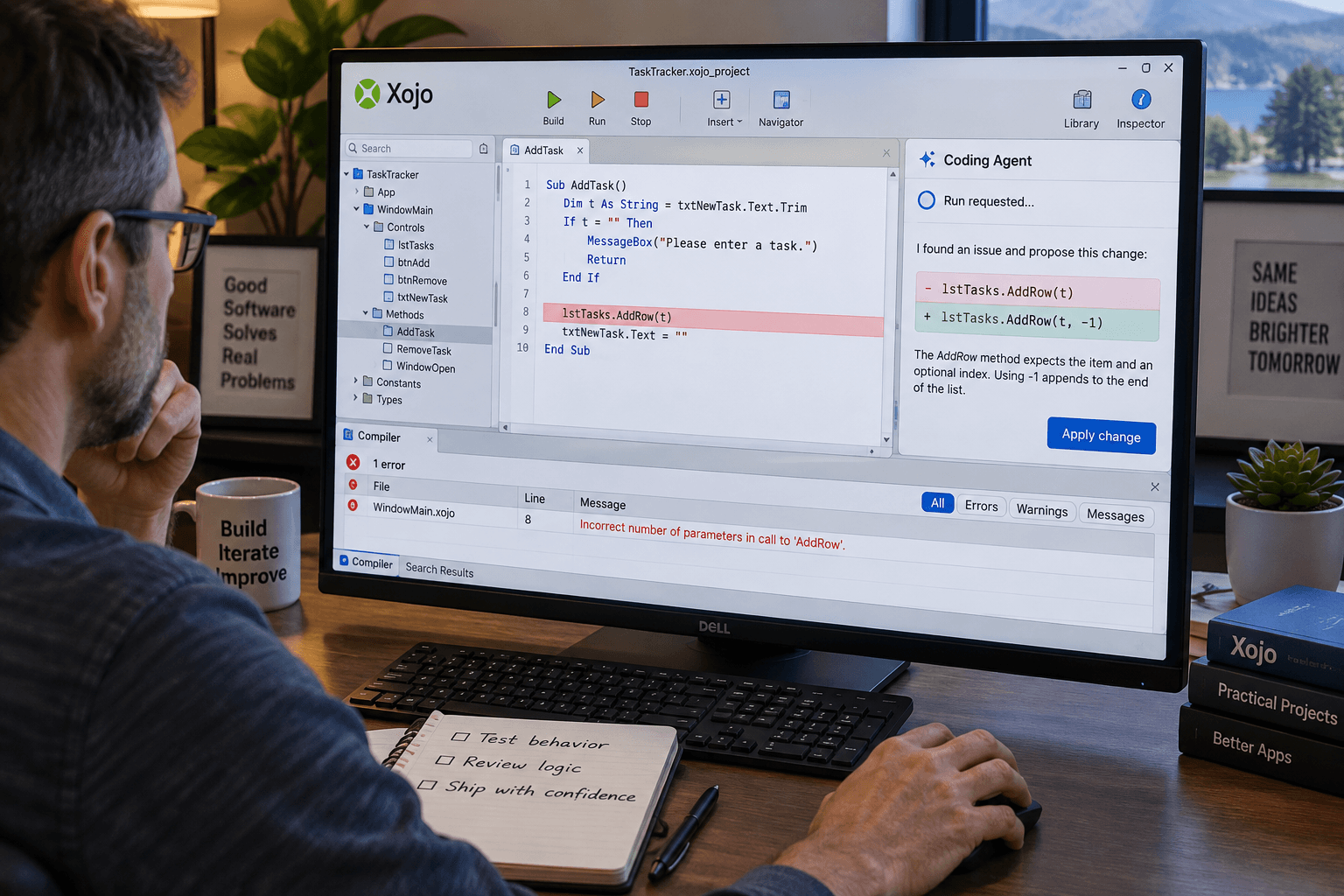
A coding agent can now change a Xojo project, ask the IDE to run it, and receive compiler errors for another attempt. Xojo 2026 Release 3 calls this Agentic Mode. It’s a useful bridge between an external coding agent and an IDE built around a visual project environment, but it doesn’t turn a successful compile into a finished application.
The distinction matters if you build internal tools, prototypes, or cross-platform apps with Xojo. The new loop can make some edits easier to iterate on. You still need to decide what the application should do, inspect the changes, and check the behavior that matters to its users.
What shipped, and who can use it
Xojo announced 2026 Release 3 on October 20. The release is available to download, and Agentic Mode is one part of a larger update that also includes new desktop, web, mobile, and database features. Xojo’s release announcement describes Agentic Mode as letting coding agents work on Xojo projects, with their edits reflected in the IDE and the agent able to run the project to get compilation feedback.
The word “agent” here means a separate coding product that works with project files. Xojo’s own setup article names Claude Code and Codex as examples, and says any coding agent that can work on the project files may be used. This isn’t a new Xojo model that independently plans and writes the whole application. Xojo provides the IDE side of a collaboration loop; you select and configure the coding agent separately.
There is a prerequisite: the project must be saved in text format. Then you turn on Agentic Mode from the File menu. Xojo reloads files as they change on disk and provides a way for the agent to request a run and receive compiler errors. The IDE’s Messages panel shows information about reloaded project files. Xojo’s release notes document the release; the product’s download page is where you can confirm what installer is currently available.
For a practitioner, the potential improvement is fairly specific. An agent no longer has to make a code edit and leave you to discover that the IDE didn’t reload it, or that the change fails to compile, before its next useful step. It can receive a signal from the compiler and attempt a correction while you watch the project update.
That may help when a task is small enough that the compiler can give immediate feedback: add a control, change a method, or repair a straightforward compile error. It can also shorten the handoff between editing text files and seeing the result in Xojo. If your current work already moves smoothly between your agent, the project files, and the IDE, though, this may not change much.
A compile loop is a narrower capability than a test
Compiler feedback is valuable because it can catch a class of errors early. A syntax error or type mismatch can stop a build before anyone tries the application. The feedback loop lets an agent react to that kind of failure instead of presenting code that has never been compiled.
But compiling answers a limited question: can the project be built under the conditions of that run? It doesn’t tell you whether the feature meets its requirements, whether a screen makes sense to a user, whether data is stored correctly, or whether the application behaves properly on each platform you support.
A project can compile while its workflow is wrong. A button may run without an error but perform the wrong action. A form might accept an invalid value. An app could appear to save a record but fail to retain it after restart. The compiler can’t determine whether a privacy decision or a business rule is appropriate, either. Those require an acceptance check and a person who understands the intended behavior.
Xojo’s own demonstration gives a glimpse of both the promise and the boundary. The company’s blog shows agents changing a project and fixing some compiler errors along the way. It also cautions that the same prompt can produce different results. That’s an example from the vendor, not an independent comparison of productivity or a guarantee that an agent will fix errors correctly on your project.
RuntimeWire’s independent coverage describes the same practical boundary: Xojo has added a feedback loop, but has not published results showing how much the integration improves development work. That seems like the right way to read the announcement. The capability is real and available; the time saved and the quality of a particular result remain things to evaluate.
Try it on a change with a visible acceptance check
If you already use Xojo and a coding agent, start with a copy of a small project or a branch you can discard. Don’t begin with the only copy of a customer-facing app or a task that could change real data. The aim is to learn whether the IDE loop helps with your work, while keeping recovery simple.
Before asking the agent to make a change, write a short acceptance check in plain language. For example: “Add a search field to this example project. Entering a name should show matching sample records; clearing the field should show them all again. Do not change the database or project settings.” Adapt that to your real task. A clear expected behavior gives you a way to evaluate the result beyond whether it compiles.
A sensible first pass looks like this:
- Make a recoverable copy. Save your current work and confirm you can return to it. If your project is under version control, check that the working tree is in a state you understand before starting.
- Save the project in text format. Agentic Mode works with the text project, so confirm that you opened the intended folder and that its files are the ones you mean to edit.
- Enable Agentic Mode. Use the File menu and watch the Messages panel as project files reload. Make sure the IDE is showing the project you expect.
- Give the coding agent one bounded task. Name the relevant behavior, the files or project area to work in if you know them, what it may change, and what it should leave alone. Ask it to stop and explain if it can’t meet the acceptance check without a larger decision.
- Watch the feedback loop. Note whether the agent edits the project, whether Xojo reloads those edits, and what happens when it requests a run. Compiler errors are clues about the build, not automatic proof that the proposed fix is sound.
- Inspect the diff and try the behavior yourself. Check what changed, run the app, and exercise the acceptance condition. If your app targets multiple platforms, decide what should be checked on each one rather than assuming one successful run covers them all.
- Keep or discard the change deliberately. If it meets your acceptance check and the diff makes sense, keep it in your normal development workflow. If not, use the saved copy or version-control tools to return to the state you had before.
This is a proposed evaluation, not a report of a test I ran. Its point is to separate three things you can observe: the agent changed files, the IDE reloaded those files, and the project compiled or ran. Then you independently check whether the requested behavior works.
Keep people’s edits and the agent’s edits from colliding
Xojo says you can use the IDE while an agent is changing files, but warns that your edits may be overwritten by the agent. That makes simultaneous editing a practical hazard even when the agent is behaving as intended. If a human changes a method while the agent is working from an earlier view, one of those edits may replace the other or leave an unclear result.
For a first trial, take turns: let the agent work, review the result, then make your own changes. If you do edit in the IDE during the agent’s run, save often and inspect the project files and diff afterward. A visible reload tells you that the IDE noticed a file change; it doesn’t establish which version of a decision should win.
Version control helps because it gives you a record and a recovery path, but it does not resolve a conflict for you. Review the actual diff before accepting it. If the agent changes project settings, build steps, or files beyond the task, find out why. A working compile should not be used as a reason to overlook unrelated modifications.
The project instructions deserve a look, too. Xojo’s blog says Agentic Mode adds an AGENTS.md file that imports XOJO-CODING.md, and that the setting is saved with the text project. If a project already has its own instructions, the company says it won’t overwrite the existing file. Check what instructions the agent will see, whether the expected Xojo guidance is included, and whether the project’s own conventions remain intact. Treat project-level guidance as a useful aid to consistency, not as a substitute for reviewing the agent’s changes.
The agent is still a separate product with separate access
“Any coding agent will work” describes file compatibility, not identical behavior or permissions. The agent you choose still has its own account, model access, configuration, and rules for reading files or running commands. Before pointing one at a project, check what it can access and what actions it can take. Don’t put secrets or customer records in a test project just because the IDE is running locally.
A local IDE doesn’t by itself mean the complete process is local. An agent may send code or prompts to a hosted service, depending on the product and configuration you use. Check that service’s data terms and your organization’s approval before using proprietary or sensitive project material. If your team has not approved a particular coding tool, this integration doesn’t make that decision for you.
Keep the first trial away from actions with external consequences. A request to run a project is not necessarily dangerous, but the application itself might send email, call an API, write to a shared database, or perform another real operation. Use a test configuration with sample data or stubbed services where appropriate. Know what a run can touch before you give an agent a project and permission to run it.
When it may be useful, and when to leave it alone
The strongest case for Agentic Mode is a Xojo practitioner who already wants a coding agent to work directly on text-format project files and would benefit from seeing edits reload and compile feedback arrive in the same IDE. It may make iteration less awkward, especially when the agent is fixing a narrow compile problem or producing a first draft that you intend to review.
The case is weaker if you don’t use coding agents, prefer to make edits manually, or have a workflow that already handles external file changes reliably. There’s no need to add an agent simply because an IDE has made one easier to connect. The agent still needs instructions, access, review, and maintenance. For a small change, using it may take longer than making the edit yourself.
It’s also not a replacement for a test plan. If the feature’s important behavior can’t be checked by compiling, write a short manual test or use your existing automated tests. If a change affects users, data, money, or security, keep the relevant review and release process. The IDE’s feedback can help an agent fix what the compiler reports, but it cannot decide whether the finished code should be accepted.
A useful trial should leave you with an answer to a practical question: did this loop reduce the work of getting a reviewable change into the IDE, while keeping the diff and behavior easy to check? Record the task, the edits, compiler result, and your own acceptance check. One trial is evidence about that task and setup, not a verdict on every project or coding agent.
Xojo 2026r3 makes a real integration step available: an external agent can edit a text project, see its work reflected in the IDE, and receive compiler feedback. Try it only where you can recover the project and judge the result. The decision to keep the code still belongs to the person responsible for the application.
Sources: Xojo’s 2026 Release 3 announcement, Xojo’s Agentic Mode setup guide, Xojo 2026r3 release notes, and RuntimeWire’s coverage.
Sources
Every claim above traces back to one of these. Go read them yourself.
- 01Xojo 2026 Release 3 announcement
Xojo / xojo.com / retrieved Oct 22, 2026
- 02Use AI Coding Agents with Xojo Agentic Mode
Xojo Programming Blog / blog.xojo.com / retrieved Oct 22, 2026
- 03Xojo 2026r3 Release Notes
Xojo Documentation / docs.xojo.com / retrieved Oct 22, 2026
- 04Xojo gives coding agents a compiler-feedback loop inside its IDE
RuntimeWire / runtimewire.com / retrieved Oct 22, 2026
Suggested reading
Selected articles based on topic, tags, and skill focus across the library.
Vibecoding News and Updates
Turn a failed build into an evidence packet
A proposed agent workflow can organize a failed GitHub Actions run into evidence and next checks. It helps a person investigate the failure; it does not diagnose the cause for them.
Vibecoding News and Updates
Use an agent to prepare an access review
A proposed agent workflow can compare an access list with your approved role rules and prepare a review packet. A person still decides who should keep access.
Vibecoding News and Updates
Ask an agent to check one staging user journey
A coding agent can walk through one local preview flow and report what it observed. Keep the test bounded, the data disposable, and the release decision with a person.