

LibraryVibecoding News and Updates8 min read
Turn a failed build into an evidence packet
A proposed agent workflow can organize a failed GitHub Actions run into evidence and next checks. It helps a person investigate the failure; it does not diagnose the cause for them.
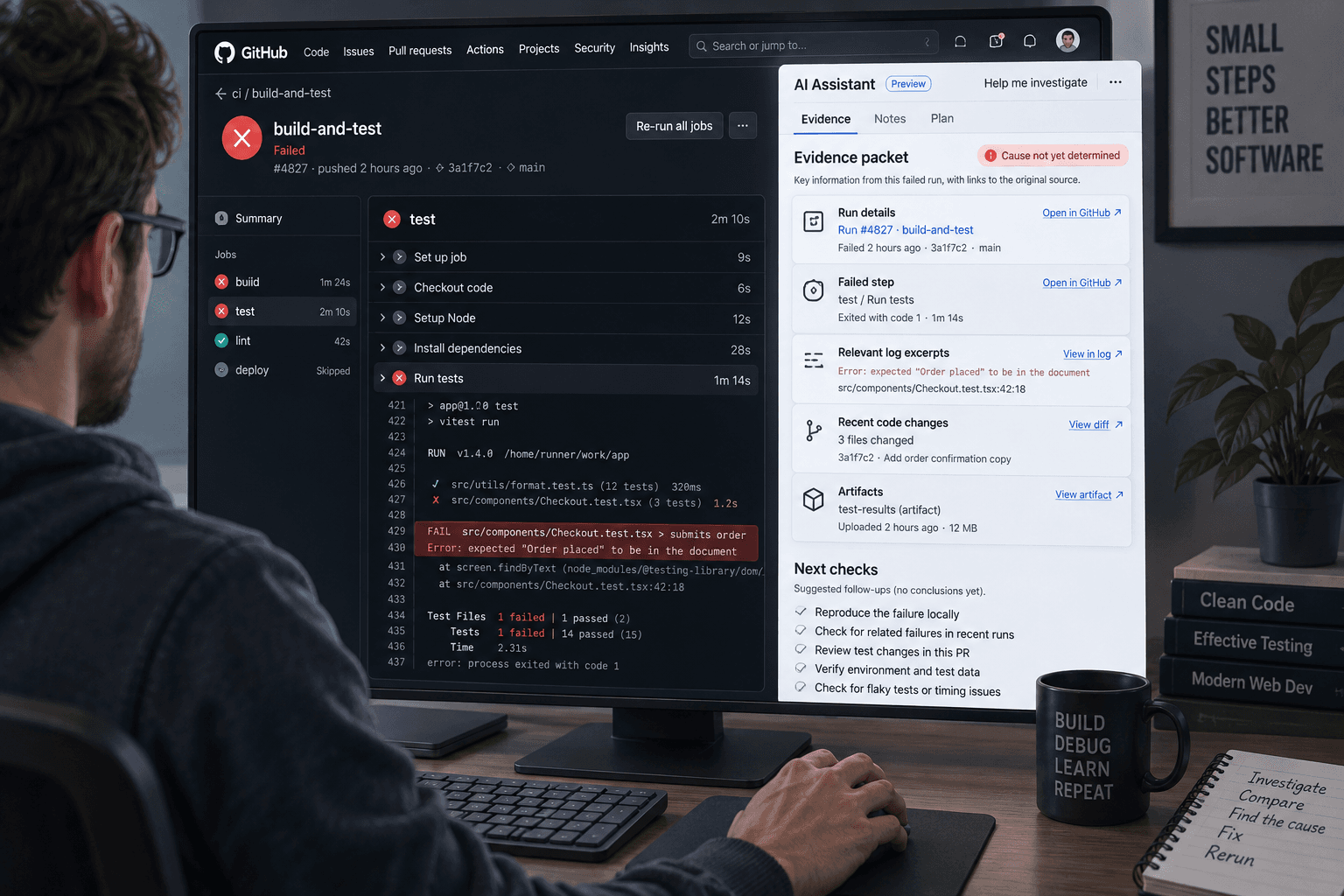
A build fails, and the only clue in the team channel is a red check with a link to several pages of logs. The developer who knows that part of the system is in another meeting. Someone still has to decide whether the failure blocks a release, looks like an environment problem, or needs investigation.
A proposed agent workflow can turn one failed GitHub Actions run into a short evidence packet for that person. The agent organizes what the logs show, points to relevant lines, and lists checks that could distinguish between explanations. It does not fix the code, rerun the workflow, or decide whether a release is safe.
This is an illustrative workflow, not a report of a build I made or tested. GitHub describes agents as able to use tools, inspect results, and adjust their approach. Its examples for automated agent workflows include investigating continuous integration failures. That makes this a plausible application, but it does not prove an agent can identify the cause of a particular failure. GitHub's description of agent capabilities also keeps responsibility for defining constraints and reviewing work with the person using the agent.
Give the agent one run and a narrow job
Start with a single failed run from a repository the reviewer is allowed to inspect. The input packet could contain:
- The repository, commit, workflow, run, and attempt identifiers
- The failed job and step names, with their status and timestamps
- The relevant log excerpts, including surrounding lines
- The workflow file and a small, relevant part of the change under test, if permitted
- Any known conditions, such as a runner image update or a dependency service being unavailable
GitHub lets people view, search, and download workflow logs with repository read access. Its REST API also documents an endpoint for downloading job logs and lists Actions repository read permission for fine-grained tokens. If a team connects an agent through an integration, the connection should have only the access needed to retrieve the selected run and related material. GitHub's workflow log guide and job log API documentation describe those sources and access requirements.
The job is to make the failure easier to investigate, not to produce a confident-sounding root cause. For each observation, the agent should provide the log location or other source. It should separate facts from hypotheses and name what it could not inspect. For example, “step unit-tests exited with code 1 after three retries” is an observation if the log shows it. “The database service caused the failure” is only a hypothesis unless the evidence supports it.
Keep the output useful to the next person
Ask for a compact packet with a few predictable parts:
- Run identity: repository, commit, workflow, run attempt, and failed job.
- Observed failure: exact step, error text, exit status, and useful log references.
- What changed: relevant commit or configuration changes the agent could actually inspect.
- Possible explanations: a short list, each tied to evidence and labeled as a hypothesis.
- What remains unknown: missing logs, unavailable artifacts, network timeouts, or unclear test setup.
- Next checks: small actions a person can take to distinguish the leading explanations.
A good packet might say that a dependency download timed out on one runner, that the log does not show whether the package registry was reachable from other runners, and that a person could check service status or compare another run. That is more useful than “probably a network issue,” because it preserves both the clue and the uncertainty.
Here is an illustrative request for a read-only setup:
Review only this failed GitHub Actions run and the supplied workflow file and commit summary. Do not edit files, rerun or cancel workflows, open a pull request, change settings, or access other repositories. Return the run identity, failed job and step, exact supporting log excerpts with locations, relevant changes you can verify, up to three possible explanations labeled as hypotheses, and the smallest next check for each. Separate observed facts from inference. If logs or artifacts are missing, say what is unavailable. Do not declare the build fixed or the release ready.
A prompt helps describe the assignment, but it is not the same as an access control. Build the connection so it cannot write to the repository, start another workflow, or reach unrelated data. If the chosen agent surface cannot enforce those limits, don’t treat the prompt as a technical boundary. GitHub's documentation says its cloud agent can make changes on a branch and push them, so a prompt-only request for “read-only” work does not itself establish that no changes are possible. GitHub's task-start documentation describes branch and pull-request behavior; check the current controls for the specific agent and integration before connecting it.
Review the packet against the source
The developer or build owner should open the original run and verify the packet's most important details. Check the run attempt, failed job, step, and quoted lines. Confirm that any cited file or change is the one associated with that commit. A plausible diagnosis that points to the wrong attempt can send someone down the wrong path.
Then examine the proposed checks. Does each one help distinguish explanations, or is it a generic list of things to try? “Check whether the package registry was reachable” may be useful if the logs show a download timeout. “Clear all caches and rerun everything” is a broader action that may hide the cause, waste time, or change the evidence. Keep actions such as rerunning a workflow with a person who understands its effects, especially if it can publish, deploy, consume paid resources, or touch external services.
Treat the packet as a handoff, not as a new source of truth. A failure can be caused by a code change, runner configuration, a missing secret, a flaky test, a service outage, or several factors at once. Logs can be incomplete or misleading. The agent may also fail to notice the important line or misread a timestamp. The engineer who knows the project still decides whether to investigate, retry, change code, or accept a known non-blocking failure.
Plan for missing evidence and safe recovery
The workflow should stop with an incomplete packet if it cannot retrieve the run, the attempt is ambiguous, or relevant logs are missing. GitHub notes that a downloaded archive after a partial rerun includes only jobs from that attempt; getting the full set may require logs from earlier attempts. The packet should say which attempts it covers rather than combining fragments without warning. GitHub's log guidance explains this partial-rerun detail.
If the agent returns a cause without a supporting excerpt, ask it to point to the evidence or mark the cause unverified. If an artifact is missing, ask the person responsible for the workflow whether there is an approved way to obtain it. Don’t grant broader credentials just to turn “could not inspect” into a complete-looking report.
Logs and artifacts may contain customer data, internal URLs, tokens, or other sensitive values. Redact them before sending them to a tool unless your organization permits that specific data and service. GitHub's documentation explains how logs and artifacts can be accessed; it does not establish that every log is safe to share with any AI provider. Keep only the run material needed for the investigation and follow your organization’s data rules.
Check whether the handoff saves useful work
Before automating this for every failure, try the proposed workflow on a few historical, low-risk runs that a developer can already explain. Have the agent produce packets without taking actions. Ask a developer who did not write the packets to check whether the observations are accurate, the log references work, and the suggested next checks would help. Compare that with the current handoff: how long it takes to understand the failure, what evidence the next person has to retrieve again, and whether the packet sends them toward a wrong explanation.
This is a practical evaluation, not a benchmark. A small set of runs can expose missing context or unhelpful formatting. It cannot prove that the agent will handle every future failure or a new workflow correctly. Keep examples that represent the kinds of failures your team sees, including cases where logs are incomplete or the first clue is misleading. Revisit the checks when workflows, runner images, or the agent integration changes.
There’s a fair case for leaving this manual. If failures are rare, a developer can read the logs faster than someone can set up an agent connection and review process. If the CI system already sends a useful alert with the failed step and owner, another summary may add little. The workflow is worth considering when repeated failures create a handoff burden and the agent can produce a more reviewable packet without gaining write access.
For the next low-risk failure, decide whether the bottleneck is understanding the evidence or fixing the code. If it is the handoff, test a read-only packet on one run and have a developer verify every key observation. If it is already easy to see what failed, keep the current process. The useful result is a clearer next investigation, not an agent declaring a red check green.
Sources: GitHub on agent capabilities and review responsibilities, GitHub's workflow run log guide, GitHub's workflow job log API, and GitHub on starting Copilot agent tasks.
Sources
Every claim above traces back to one of these. Go read them yourself.
- 01About GitHub Copilot agents
GitHub Docs / docs.github.com / retrieved Oct 26, 2026
- 02Using workflow run logs
GitHub Docs / docs.github.com / retrieved Oct 26, 2026
- 03REST API endpoints for workflow jobs
GitHub Docs / docs.github.com / retrieved Oct 26, 2026
- 04Kick off a task with Copilot agents on GitHub
GitHub Docs / docs.github.com / retrieved Oct 26, 2026
Suggested reading
Selected articles based on topic, tags, and skill focus across the library.
Vibecoding News and Updates
Use an agent to prepare an access review
A proposed agent workflow can compare an access list with your approved role rules and prepare a review packet. A person still decides who should keep access.
Vibecoding News and Updates
Ask an agent to check one staging user journey
A coding agent can walk through one local preview flow and report what it observed. Keep the test bounded, the data disposable, and the release decision with a person.
Vibecoding News and Updates
Turn vendor insurance certificates into a review queue
A proposed agent workflow extracts fields from vendor insurance certificates and compares them with your own checklist. It gives a person a review queue, not an insurance decision.