

LibraryFoundational AI: Do's and Don'ts11 min read
Make AI document answers traceable before you rely on them
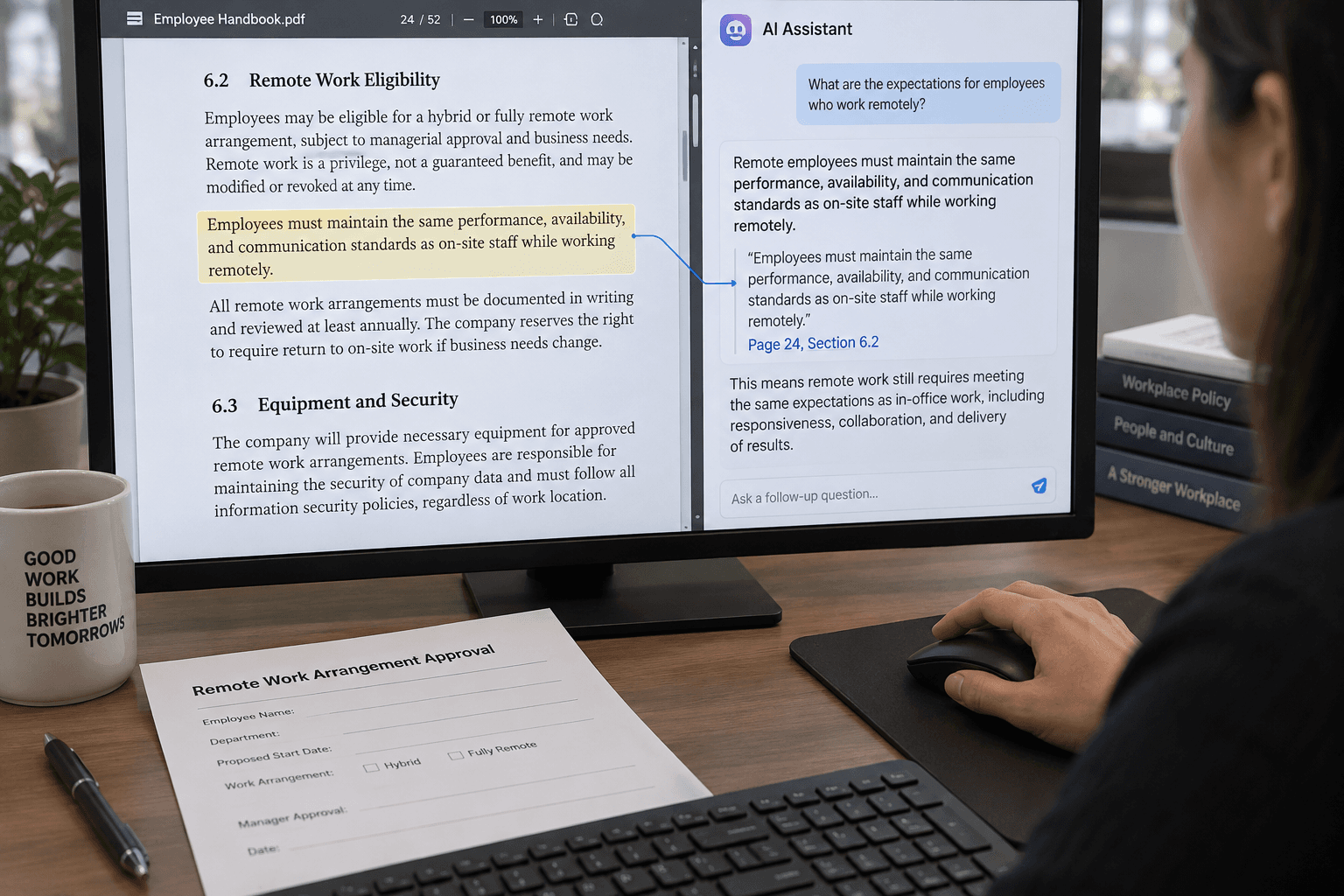
You need one answer from a 30-page procedure: can a customer get a replacement before the returned item arrives? You upload the document and ask AI. It says yes, then gives you a polished explanation that sounds like it came straight from the policy.
Before you act on that answer, ask for the exact passage that supports it. Then open the passage in the original document and read what comes before and after it. The sentence might be limited to damaged items, require a manager’s approval, or apply only to orders under a particular amount. The answer is useful when it helps you find the rule. The document and the person who owns the process still determine what the rule means.
This is a practical way to use AI for document questions: ask it to locate, quote, and point; use your own review to confirm, interpret, and decide.
Ask for a trail, not just an answer
AI tools can work with uploaded documents and answer questions about them. OpenAI’s current file-upload guidance describes finding references to a topic and extracting relevant quotes as supported uses. That makes a long document easier to search. It doesn’t make the answer an official interpretation of the document.
For a question that affects what someone will do, request more than a yes or no. Ask for:
- The answer the document appears to give.
- The exact sentence or passage that supports it.
- A page, heading, section, or other location you can find in your copy.
- Any nearby condition, exception, approval, deadline, or definition that changes the answer.
- Anything the document doesn’t settle.
If your tool can give formal citations, use that feature. Anthropic’s API citation documentation describes references to exact passages and locations in provided documents, including page ranges for PDFs. That documentation describes a capability in Anthropic’s API; it doesn’t mean every AI chat product offers the same citation controls. If your tool only produces ordinary text, ask for a short quote and a heading or page reference, then locate it yourself.
Here’s a prompt you can adapt:
Answer this question using only the attached procedure: Can a replacement be issued before the returned item arrives? Give me the answer the document supports, the exact passage that supports it, and the page or heading where I can find that passage. Include nearby conditions, exceptions, approval steps, and deadlines that could change the answer. If you can’t find a clear answer, say what remains unresolved. Don’t fill gaps with general practice or assumptions. Question: [your question]
That prompt is a request for a traceable draft. It is not an access control, an accuracy guarantee, or permission to paste a document into an unapproved tool. Follow your organization’s rules for the information in the file.
An illustrative answer can still be wrong
The following procedure and AI response are hypothetical. They are examples for practice, not a real company policy or a tested model result.
Suppose a procedure says:
For items reported damaged on arrival, a support lead may approve a replacement before the returned item reaches the warehouse when the customer provides photographs and the order value is below $300. For orders of $300 or more, the operations manager must approve the exception. The usual return process applies to items that are not damaged on arrival.
The question is: “Can we send a replacement before the return arrives?” A careless answer might say, “Yes. The procedure allows replacements before the item reaches the warehouse.” That answer includes words supported by the passage, but it drops the limits that make the rule usable: damage on arrival, photos, a value below $300, and a support lead’s approval. It also leaves out the higher-value exception and the ordinary path for other returns.
A more useful draft might say:
What the procedure appears to allow: For an item reported damaged on arrival, a support lead may approve a replacement before the return reaches the warehouse if the customer provides photographs and the order is under $300. For orders at or above $300, the operations manager must approve the exception. What it does not establish: This passage does not authorize advance replacement for ordinary returns. Check the regular return process for those cases. Source to verify: The paragraph beginning “For items reported damaged on arrival” in the current returns procedure.
Even this careful-looking version needs checking. Does “below $300” mean the pre-tax item price, the order total, or something else? Does another section define “damaged on arrival”? Is there a required form or system record? The quoted paragraph points you toward those questions; it doesn’t settle them.
Check the passage in its document
Start by finding the cited location in the same file you gave the AI. Read the whole paragraph, not just the quoted sentence. Then read the next paragraph and any headings or definitions that the answer relies on.
Look for words that change who qualifies or what happens next: “only,” “unless,” “must,” “may,” “before,” “after,” “except,” and “subject to.” A short quotation may support the main action while omitting one of those boundaries. For a table, inspect its column labels, row headings, footnotes, and units. A value without the column heading or footnote beside it can mean something different from what the answer says.
Compare the quoted words with the source. If the quote is inaccurate, incomplete, or nowhere in the document, stop and ask the tool to find the passage again—or search manually. Don’t treat a plausible section title as proof that the answer came from that section.
Next, check that the file is the one people should use. A document can be old, a draft, a copied export, or a version for a different team. Read its title, effective date, version label, and owner if those are available. If the answer concerns a customer-facing commitment or an internal approval, confirm the current rule through the normal process owner when the document’s status is unclear.
This is where citations help and where their limits matter. A link or page number can make it faster to inspect evidence. It does not tell you that the source is current, that the tool chose the right document, or that the quotation answers the whole question. OpenAI’s search guidance makes a similar point about web results: citations can be incomplete, outdated, or incorrect, so open the source and check whether it supports the answer. The same checking habit is useful for a file citation.
Keep the question narrow enough to verify
A broad request such as “What is our replacement policy?” can invite a broad answer stitched from several sections. That may be useful for orientation, but it’s harder to check and easier to mistake for a definitive rule. Start with the decision you need to make: “Can support approve a replacement before the return arrives for a damaged item under $300?”
If the answer depends on several details, split the inquiry into questions you can verify separately:
- Does the procedure cover this kind of item and situation?
- What conditions must be met before approval?
- Who has authority to approve it?
- What timing or documentation does the procedure require?
- Which section governs if another rule appears to conflict?
Ask the tool to say which passage supports each answer. Then check each passage in context. If the file contains two conflicting instructions, don’t ask the model to choose the one that sounds more reasonable. Bring the conflict to the document owner or the person responsible for the process.
A narrow question also makes “not found” useful. If you ask, “Does the procedure specify a deadline for submitting photos after delivery?” and the tool can’t locate one, that is a signal to inspect the relevant section yourself. It isn’t proof that no deadline exists elsewhere, in another policy, or in a system setting. A good answer can tell you what it found and leave the remaining uncertainty visible.
Don’t make a quote do more than it says
A source passage may state a rule without explaining how it applies to your particular case. Consider the difference between “A manager may approve an exception” and “A manager must approve every exception.” One word changes the responsibility. Or a policy might say that a reimbursement is available “up to $150,” while another section specifies that the limit is per day. A response that quotes the amount but omits the unit can mislead someone even though the number itself is accurate.
Keep three things separate as you review:
- The document says: the words you can point to in the source.
- The case facts are: the details you know about the situation you’re handling.
- The decision is: how the rule applies, including any interpretation or authorization your process requires.
AI can help organize those parts, but it may blur them. It can assume a missing detail, apply a definition from the wrong section, or repeat the strongest-looking sentence and miss an exception. If the answer depends on a fact you haven’t provided, ask what information is missing. Don’t let a likely guess enter the case record as a verified fact.
Likewise, if a policy doesn’t answer the question, don’t use AI to complete the policy by borrowing general advice from the web or from its training. Ask it to say that the document is silent or unclear. Then ask the owner what decision applies and whether the procedure needs clarification. A gap in the written rule is a work item for the person responsible; a confident paragraph cannot close it.
Use a small review before you reuse the answer
For a one-off, low-risk question, the check can be quick:
- Confirm the document. Check its name, effective date, and version against the copy your team should use.
- Find the cited passage. Open the page, heading, or section yourself.
- Read the context. Include nearby conditions, exceptions, definitions, and cross-references.
- Match the case facts. Confirm the details that make the rule apply, such as order value, date, product type, or approval role.
- Mark what remains unknown. If the document doesn’t settle a question, send it to the right owner rather than letting the answer fill the gap.
- Keep a useful reference. If you share the result, include the document name and section so the next person can reopen the same source.
If you’re answering questions repeatedly from the same set of procedures, make that review part of the workflow. Use approved current documents, record which version was checked, and have the process owner review the prompt and output format. Try questions with exceptions and missing information—not only easy cases. When a policy changes, check whether the answers or saved reference material still point to the current version.
Don’t turn a successful check on one question into a claim that the system is reliable across all policies. A small sample can reveal obvious mistakes and awkward gaps. It doesn’t test every document, exception, or future change. Keep a person responsible for decisions that affect payments, customer commitments, safety, access, or other consequential work.
When this isn’t the right shortcut
A scanned page may not be readable as text, or a table’s layout may get lost when the file is processed. OpenAI’s current file-upload documentation notes that what a tool can read from images embedded in documents depends on the plan and file type; some document processing uses extracted text rather than the embedded image. If a key rule is in a scan, diagram, handwritten note, or dense table, inspect the original directly. Don’t assume that an upload contains everything a person sees on the page.
The same caution applies when the source itself is incomplete or contradictory. AI can surface the conflict if you ask, but it can’t tell you which department has authority to resolve it unless that authority is clearly documented. For a legal, financial, personnel, safety, or customer-impacting decision, use the review process that applies to that decision. The tool can help locate material for the reviewer; it doesn’t replace the reviewer.
And protect the document before you upload it. Policies and procedures may include customer details, internal controls, employee information, or confidential terms. Use only an account and tool approved for that material. OpenAI’s upload guidance says data-use and retention depend on the service and settings, and notes that saved files and conversations can have separate retention behavior. Check the terms for the actual account you’re using rather than generalizing from another plan or another vendor.
The decision is whether you can trace it
Use AI when it can save you time finding a passage in an approved document. Ask for the exact wording, a location, and any conditions that could change the answer. Open the source, read around the quote, confirm the version, and compare the rule with the facts of the case.
If you can’t find the passage, the source is outdated, or the document leaves an important point unresolved, don’t treat the answer as permission. Take the remaining question to the person who owns the process. The standard is simple: before you act on a document answer, you should be able to trace it back to the current source and explain what that source actually supports.
Sources: OpenAI’s file-upload guidance, OpenAI’s guidance on reviewing web-search sources, and Anthropic’s API citations documentation.
Sources
Every claim above traces back to one of these. Go read them yourself.
- 01Uploading files and audio to ChatGPT
OpenAI Help Center / help.openai.com / retrieved Oct 18, 2026
- 02Searching the web with ChatGPT
OpenAI Help Center / help.openai.com / retrieved Oct 18, 2026
- 03Citations
Anthropic Claude Platform Docs / platform.claude.com / retrieved Oct 18, 2026
Suggested reading
Selected articles based on topic, tags, and skill focus across the library.
Foundational AI: Do's and Don'ts
Define your team's terms before asking AI to write
Words like “urgent,” “active,” and “resolved” can mean different things to different people. Give AI your team's definitions before asking it to use those terms in shared work.
Vibecoding News and Updates
Turn vendor insurance certificates into a review queue
A proposed agent workflow extracts fields from vendor insurance certificates and compares them with your own checklist. It gives a person a review queue, not an insurance decision.
Foundational AI: Do's and Don'ts
When AI gives a different answer, check what changed
Two AI answers to the same work request can use different words. Judge whether the difference changes a fact, a commitment, or a next step before deciding which draft to use.