

LibraryFoundational AI: Do's and Don'ts10 min read
Turn a recurring request into a prompt with slots
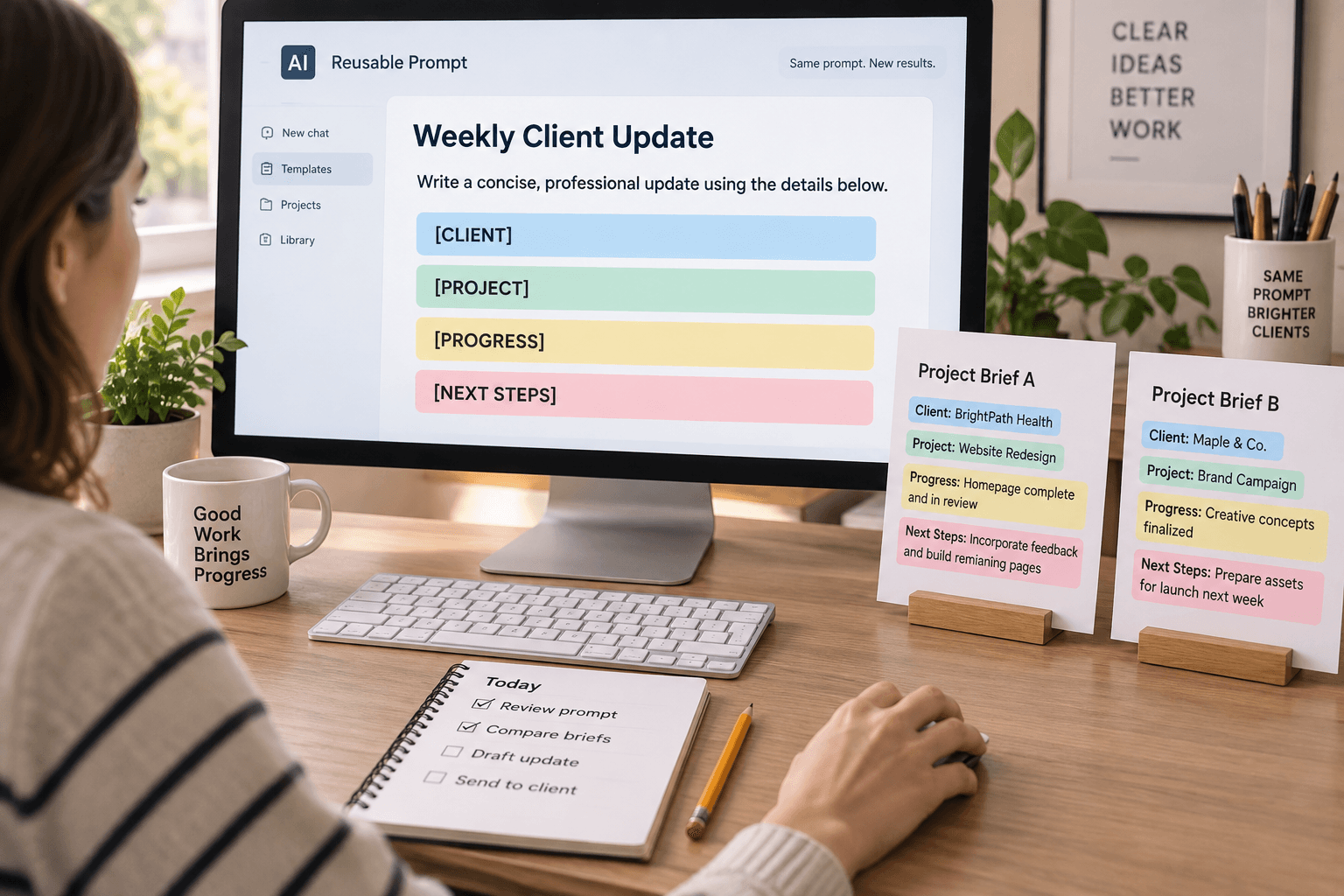
A weekly customer update often asks for the same kind of help: turn rough notes into a short, readable draft. The names, dates, decisions, and open questions change each week. If those details get mixed into a long instruction that you keep copying and editing, it’s easy to leave in last week’s deadline or forget to mention what the draft should do.
Try giving the changing details their own named slots. Keep the instruction about the task in one place, and put this week’s information under clear labels. The useful idea is simple: stable directions stay stable; variable details get named spaces.
OpenAI’s current prompt-management documentation describes variables such as {user_goal} as placeholders that separate a prompt’s static instructions from instance-specific inputs. You can use the same idea in a saved prompt, a document, or a plain text note; you don’t need a particular product feature to try it. OpenAI’s prompt-management guide shows the pattern and explains how its Playground prompts can use variables.
Choose a task that really repeats
A prompt with slots is most useful when the job stays roughly the same but some of the information changes. A team might prepare a weekly project update, summarize a service request, or draft an internal handoff. Each instance needs fresh details, while the basic request stays recognizable.
Start by asking: “What part of this request do I repeat every time, and what do I replace?” The repeated part is your instruction. The replaced parts are possible slots.
For a weekly update, the stable instruction might say:
- Write for a colleague who needs to know what changed and what needs attention.
- Use only the supplied notes.
- Keep the draft concise and easy to scan.
- If a date, owner, or decision is missing, mark it as missing instead of guessing.
The changing information might be the reporting period, completed work, next steps, blockers, and intended audience. Give each one a label so it’s obvious where it belongs.
Don’t create a slot for every possible detail. Start with the few details you actually replace from one use to the next. Too many labels turn a handy prompt into a form no one wants to fill in.
An illustrative prompt with named slots
The following is a fictional example. It isn’t a report from a real team or a claim that this prompt has been tested in a particular AI product.
Draft a weekly project update for the intended audience using only the information in the labeled sections below. Keep the update concise. Separate completed work, next steps, and blockers. Do not invent dates, owners, progress, or decisions. If information needed for the update is missing or conflicts with another section, mark it clearly for a person to resolve. Do not send the update or change any records. Reporting period: [reporting period] Audience: [who will read this] Completed: [work completed during this period] Next steps: [planned work, with owners or dates only if supplied] Blockers or open questions: [known blockers, unresolved questions, or “none supplied”] Return a draft with the headings “Completed,” “Next,” and “Needs attention.” After the draft, list any missing or conflicting information that a person should check.
The labels do useful work. “Reporting period” tells you which date belongs in the update. “Audience” gives the model context about who needs to understand it. “Completed” and “Next steps” separate past work from plans. “Blockers or open questions” leaves space for uncertainty instead of encouraging a tidy but unsupported story.
The instruction tells the model how to use those inputs. It also says what to do when a detail is missing, and it draws a boundary around actions: create a draft, don’t send it or update another system. The boundary matters because a well-structured prompt is still just an instruction to a model. It isn’t a permission control or a guarantee that the result will follow the request.
Keep the slot labels tied to real information
A label only helps if a person filling it in understands what belongs there. “Status” can mean current state, percentage complete, or a manager’s opinion. “Next steps” may mean approved commitments or ideas someone suggested. If a label could be read in several ways, make it more specific or add a short definition.
For example, instead of a general “Updates” slot, use “Completed this period.” Instead of “Dates,” say whether you mean “Due dates explicitly stated in the notes.” That last phrase helps discourage an AI from filling in a plausible deadline when none was provided.
Keep source information in the slot where it belongs. If notes contain a customer’s exact request, include the request or an appropriate excerpt rather than only a paraphrase that drops an important qualification. If a fact comes from a separate approved record, either provide the relevant information or say that the model should leave it unresolved. Don’t assume a saved prompt can see a file, CRM, inbox, or project board unless you deliberately give it access through an approved tool.
This structure also makes the request easier for a teammate to read. Someone looking at the prompt can see what the instruction asks for and what inputs the draft depends on. If the result is wrong, the labels can help you locate whether the missing piece was an unclear instruction, an empty slot, or an input that didn’t say what the output assumed.
Check the first result against the inputs
A named slot doesn’t make a model’s answer reliable by itself. The model can still misread a note, place a planned item under “Completed,” or overlook a conflict. OpenAI’s guidance for ChatGPT recommends being clear and specific, then reviewing and refining a prompt based on the response. That is a useful loop here: run the prompt, inspect what it produced, and adjust the instruction or labels where the evidence shows a real problem. OpenAI’s prompting guidance describes that iterative process.
Use one low-risk example first. Compare every meaningful statement in the draft with the relevant input. Ask yourself:
- Is each completed item actually described as completed?
- Did the draft add a date, owner, or decision that the notes don’t support?
- Did it preserve a condition or uncertainty from the source material?
- Are the sections clear to the person who will read the update?
- Did it flag missing information instead of silently filling the gap?
For the fictional example, suppose the “Next steps” slot says, “Confirm the review schedule; date not set.” If the draft says “The review is scheduled for Friday,” it has added a fact. The right response is to correct the draft, then decide whether a clearer instruction or a more explicit slot description would prevent that mistake next time. Don’t quietly treat a fluent sentence as evidence that the date exists.
The check should be proportionate to the work. A draft that will only help one colleague prepare for a meeting needs a different review than a message that will go to a customer or a report that informs a financial decision. The prompt can prepare the output; the person responsible for using it still checks the result at the level the decision requires.
See what happens when a slot is empty
The most useful test is often not a complete example. It’s a realistic incomplete one. Leave one slot blank, or write “not supplied,” and see whether the answer marks the gap or invents a plausible detail.
For instance, remove the reporting period from the fictional weekly update. The expected behavior should be clear: the draft should flag that no period was provided, not infer the current week. If the model supplies a date anyway, the prompt hasn’t established a dependable missing-input behavior. You might make the relevant instruction more explicit, but you should still review future outputs; changing a sentence doesn’t guarantee the same response every time.
You can also put two pieces of information in tension. If “Completed” says a review is finished while “Blockers” says approval is still pending, the draft should preserve that conflict for a person to resolve. The goal of this exercise isn’t to add a second prompting technique. It’s to check whether the named input areas and the existing instruction are clear enough to support this recurring task.
If the output mixes sections or adds unsupported details, fix the input before deciding the prompt needs more complexity. Was the note itself ambiguous? Did two slots contain conflicting versions? Did the instruction fail to say what should happen when facts are absent? A prompt can’t resolve a business decision the team hasn’t made. It can make the unresolved point visible.
Reuse the instruction, replace the inputs
Once the prompt is useful, keep the stable part somewhere the team can find and maintain. Each time you use it, replace the contents of the named slots with the information for that instance. Keep the labels unchanged unless you have a reason to revise the task.
If the prompt lives in a tool that supports saved prompts or variables, those features may make the repeated inputs easier to fill. OpenAI’s documentation covers those capabilities in its own Playground and API context; availability and behavior depend on the product and setup. A shared text file or document can serve as a manual template when a saved-prompt feature isn’t available. The label pattern is portable even when the interface isn’t.
Give a reusable prompt a clear owner if it affects a team process. That person can update the instruction when the work changes and tell users what each slot means. A prompt that no one maintains can become misleading: the workflow changes, but the instruction still asks for yesterday’s categories or output.
When you change it, check the same kind of ordinary example again. Did the new instruction help with the issue you meant to fix? Did it make another part of the output less clear? Keep the edit small enough that you can tell what changed. This isn’t a formal performance claim; it’s a practical way to avoid assuming that a revised template is better just because it reads more neatly.
When slots don’t help
A one-off request usually doesn’t need a reusable template. If you spend longer naming fields than you would spend writing a clear request, use a direct instruction. Slots are for repeated work where the changing details are easy to identify and the basic task remains stable.
They also don’t fix missing or poor source information. If the notes disagree, a label won’t decide which source is right. If no one knows whether a task is approved, a prompt can’t create approval. If a summary depends on a system the model cannot access, a blank slot doesn’t fetch the data. A person still has to provide or resolve the information.
Be careful about the material you put into any AI tool. Follow your organization’s rules for customer, employee, financial, and confidential information. A prompt template doesn’t change the tool’s data handling, access, or retention. Use only a tool and workflow approved for the information involved.
Finally, don’t keep a template simply because it is reusable. If the model’s draft takes as long to correct as it would take to write, the structure may not be earning its place. If different instances require entirely different instructions, one template may be hiding several distinct tasks. The aim is a repeatable request that makes the changing details visible, not a formality around every use of AI.
A small exercise for this week
Choose one low-risk task you’ve asked AI to do more than once. Copy the recurring instruction into a stable section. Then identify the few pieces of information you replace each time and give each a clear label. Add one sentence about what to do if a needed detail is missing, and try one realistic incomplete input.
Compare the draft with the inputs before using it. If it keeps the facts and makes the missing detail visible, reuse the prompt for that kind of task. If it guesses, revise the instruction or return to a direct request until you can check the result reliably. The useful outcome is a clearer boundary between what you ask AI to do and what changes each time you ask.
Sources
Every claim above traces back to one of these. Go read them yourself.
- 01Prompt management in Playground
OpenAI Help Center / help.openai.com / retrieved Oct 20, 2026
- 02Prompt engineering best practices for ChatGPT
OpenAI Help Center / help.openai.com / retrieved Oct 20, 2026
Suggested reading
Selected articles based on topic, tags, and skill focus across the library.
Foundational AI: Do's and Don'ts
When AI gives a different answer, check what changed
Two AI answers to the same work request can use different words. Judge whether the difference changes a fact, a commitment, or a next step before deciding which draft to use.
Foundational AI: Do's and Don'ts
Put events in order before asking AI to summarize them
When notes describe the same job out of order, ask AI to build a dated event list before it summarizes. Then check the sequence against the original records.
Foundational AI: Do's and Don'ts
Keep disagreement visible in AI summaries
When two sources disagree, a smooth AI summary can hide the detail your team needs to decide. Ask it to show the conflict and keep the decision with the person who owns it.