

LibraryFoundational AI: Do's and Don'ts10 min read
Tell AI what a useful answer looks like
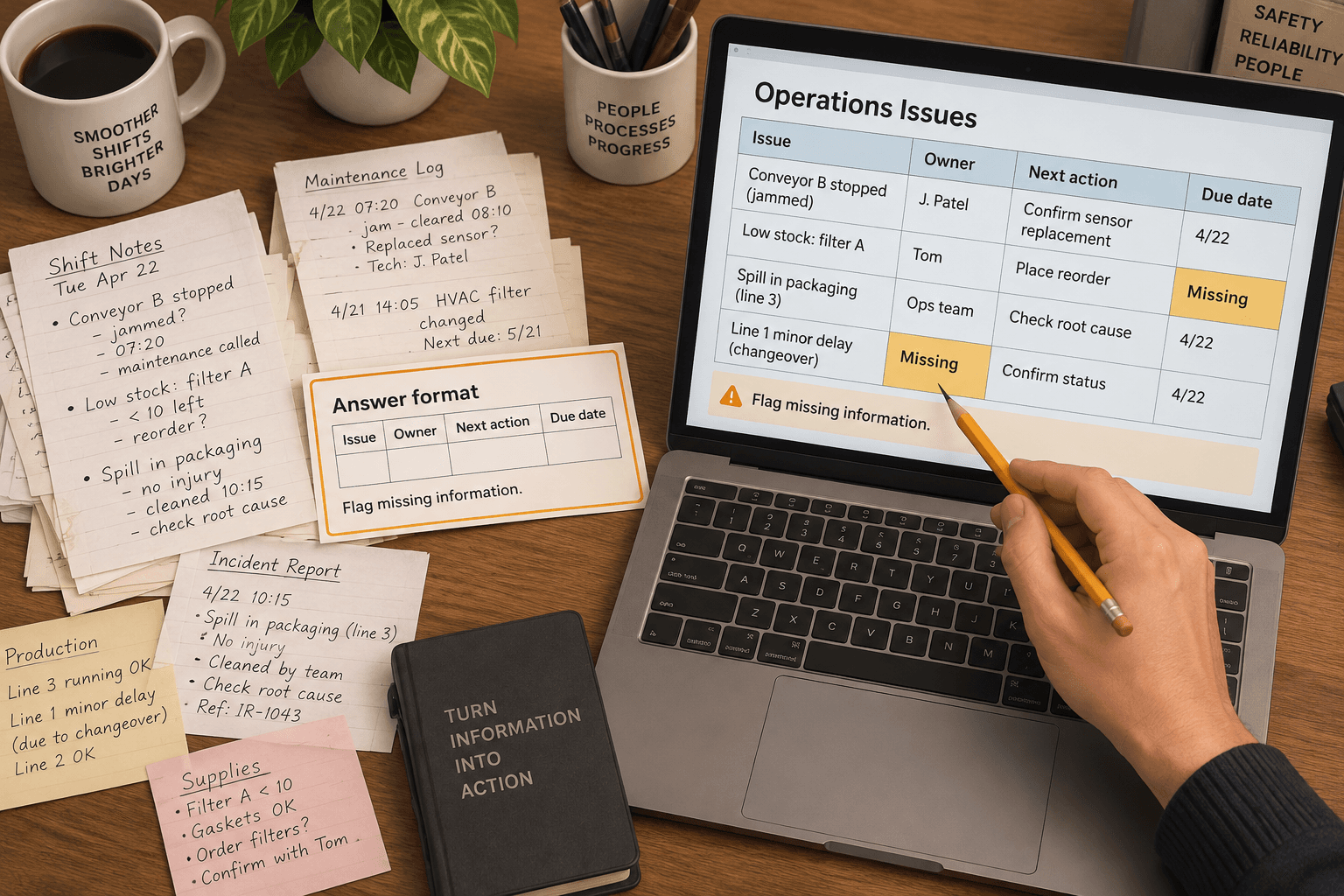
A useful AI answer can still create extra work if it arrives in the wrong shape. You ask for a quick review of open requests, and get three paragraphs where you needed a short list of the requests that need a person today. Now you have to reread the notes, find the relevant items, and decide whether the model left anything out.
Try one small change: describe the answer you need before you ask for the work. Name the fields, what belongs in each one, and how the model should handle missing information. Think of it as an output contract. It tells the AI what a usable result looks like, while leaving you responsible for checking whether the result is accurate.
Start with the next use of the answer
Before writing a prompt, ask what someone will do with the response. Will they scan it in a meeting? Copy a few rows into a tracker? Decide which items need follow-up? The answer's next use determines its shape.
For example, suppose a team lead reviews short notes about requests that are waiting on a reply. A paragraph may be fine for a general recap, but it makes it harder to scan for the request, the next action, and the person expected to take it. A compact table with one row per request may be more useful.
That doesn't mean every task needs a table, spreadsheet, or JSON object. It means choosing a form that makes the required information visible. For a short comparison, a table might help. For a decision, a few labeled sections might work better. For a list to paste into another system, the exact fields and separators matter. The form should follow the work, not the novelty of a format.
AI providers give similar basic advice: state the task clearly and specify the response format when it matters. OpenAI's prompting guidance for ChatGPT recommends clear, specific prompts and refining them after reviewing the response. Google's prompt design guidance shows how to specify formats, including simple structured outputs, and advises using a structured-output feature for more complex API schemas. Those are starting points for shaping a response, not guarantees that its contents are right.
Write the contract in plain language
For a small recurring task, you usually don't need technical schema syntax. A few explicit fields and rules are enough to help the model aim at the answer you can review.
An output contract should answer four questions:
- What is one item? A request, account, decision, or event should have a clear boundary.
- Which fields do you need? Include only information someone will use.
- What counts as an acceptable value? Say whether a field should contain a date, a short phrase, a name, or a source note.
- What happens when the information is missing? Make it clear that missing evidence should remain missing, rather than being completed by guesswork.
For the waiting-requests example, a contract could be:
- One row for each request in the supplied notes.
- Fields: request, next action, action owner, and evidence from the notes.
- Use a short quote or close reference to support the request and action.
- If the notes don't identify an owner or next action, write "not stated."
- Do not add a priority unless the notes give a reason for it.
This contract defines the shape of the answer without asking the model to decide your team's policy. The team still determines what makes a request urgent, who may assign work, and what should be escalated. If those rules matter, provide the approved rule for the task or leave that judgment to its owner.
See the difference in a small example
The following notes and outputs are illustrative, not a report of a test or a real team situation.
Input notes:
The finance lead asked for the updated vendor form. Jamie said the supplier has not sent it yet. Jamie will check with the supplier Thursday. The onboarding meeting is next week.
Loose request:
Summarize this and tell me what needs follow-up.
A model might return a fluent paragraph about the missing form and upcoming meeting. The response could be accurate as far as it goes, but it might leave the reader to work out who will do what and when. It might also treat the meeting as the reason to escalate, even though the note doesn't say that.
Request with an output contract:
From the notes below, return one row for each follow-up that is explicitly stated. Use these fields: request, next action, owner, timing, and supporting note. Keep the action and supporting note short. If the notes don't state a value, write "not stated." Do not add a priority, deadline, or consequence that isn't in the notes. Notes: [paste approved notes here]
An illustrative answer might be:
| Request | Next action | Owner | Timing | Supporting note | | ------------------- | ----------------------- | ----- | -------- | ---------------------------------------------- | | Updated vendor form | Check with the supplier | Jamie | Thursday | "Jamie will check with the supplier Thursday." |
The contract makes several details visible for review. It limits the output to follow-ups that the notes actually state. It gives the reader an owner and timing when they are present. It also gives the reviewer a short piece of evidence to compare against the original. The result still needs a person to check it. A plausible table can contain a misread date or omit an important sentence just as easily as a plausible paragraph can.
Keep the fields few and meaningful
It is tempting to ask for every detail that might someday be useful. That can make the answer harder to scan and give the model more opportunities to fill empty columns with guesses. Start with the smallest set of fields that serves the next action.
In this example, the lead needs to know what is waiting, what someone plans to do, who owns it, and when. A field for estimated business impact may sound useful, but the notes don't contain enough information to calculate it. Adding that column could create a false sense of precision. If impact matters, someone needs to define the evidence and method for estimating it. A prompt cannot make absent information appear.
Field labels should be concrete. "Status" can mean anything from a CRM stage to a person's impression. "Next action stated in the note" narrows the job. "Risk" can ask the model to invent a judgment; "specific consequence mentioned" asks it to report what the source says. The more a field invites interpretation, the more the reviewer needs to understand the rule behind it.
Use labels that will make sense to the next reader, too. If the output goes to a team tracker, match the tracker’s actual field names where possible. If people use "owner" to mean the person accountable for the task, don't let it drift into "the person mentioned most often." The output should fit the work's existing language, not quietly create a new one.
Check the result against the contract
Reviewing the answer doesn't have to mean rereading every word from scratch. The contract gives you a small checklist:
- Is each row or section a real item from the input?
- Are the required fields present?
- Does each value follow the stated rule?
- Can you find the supporting detail in the source?
- Did the answer leave missing information marked as missing?
- Did it add a judgment, deadline, or commitment you didn't ask for?
For a one-off, low-stakes use, this may be a quick visual scan. For a recurring process, review a handful of different cases, including one that has a missing field or an ambiguous note. Don't just check the cleanest example. If the output goes into a system of record, affects a customer, or starts work for another person, the right reviewer should verify it before it is copied or acted on.
If one row is wrong, trace it to the contract. Maybe the field was vague, the input didn't identify the owner, or the instruction asked for a summary when the reader needed evidence. Change the relevant part, then compare the next answer against the same requirements. OpenAI's guidance recommends iterative refinement: review the response and adjust the wording or context. A revision can improve the response, but it doesn't establish how often the task will work across future inputs.
Don't mistake the shape for correctness
A table can look orderly while being wrong. A required field can contain an invented name. A valid-looking date can be inferred from context that doesn't justify it. A well-formed JSON object can still contain a false value. Formatting helps you inspect information; it doesn't validate that information for you.
That difference matters when the output will feed another process. Google's documentation for structured outputs distinguishes a response that follows the requested JSON structure from one whose values are semantically correct, and recommends validating values in the application. A person doing a manual task needs the same distinction: check the facts and the meaning, not just whether every column is filled.
If a team uses a model API with a structured-output option, that may enforce parts of a machine-readable format. It can help ensure a response conforms to a supported structure, which is useful when software needs to parse the result. It doesn't make the extracted facts true or decide whether the output is safe to use. Check the provider's current documentation for feature availability, supported schema rules, and limitations before building a process around it.
For ordinary chat, a plain-language request may be sufficient. Don't introduce code, a new tool, or a complex schema just to get a short list. The practical concept is defining what the answer should contain, not buying or building a particular feature.
A five-minute exercise
Choose one low-risk task you already do with AI, such as turning approved meeting notes into a follow-up list. Use notes you are allowed to share with the tool. Don't start with a task that sends messages, changes records, makes a personnel decision, or determines what a customer is promised.
- Write down what the reader will do with the answer.
- Choose the few fields that reader needs for that next step.
- State what each field means and what to write when the source doesn't establish a value.
- Ask AI to produce only that form from a small set of notes.
- Compare each field with the original notes, including the missing-value cases.
- Remove fields nobody used, and clarify any field that produced inconsistent or unsupported answers.
This is a quick practice exercise, not a controlled evaluation. A few examples can reveal a confusing field or a weak instruction, but they cannot show that the task is reliable across every future case. Keep the original source available while you review. If the process is important, decide who owns the contract, how often it should be reviewed, and what happens when the output does not meet it.
There are times when defining a format is extra work without much payoff. If you're asking for ideas or a first-pass explanation, a natural paragraph may be exactly what you want. A detailed output contract can also make a task brittle if the work varies widely or the categories haven't been agreed. In those cases, begin with a flexible answer and decide whether there is a recurring next step worth structuring.
When you do need a repeatable answer, describe its shape before you ask for it. Keep the fields tied to a real next use, say how to handle information the source doesn't contain, and check the values against the material. The output contract is useful when it makes the work easier to inspect. If it only makes an answer look tidy, simplify it.
Sources: OpenAI's prompt engineering best practices for ChatGPT, Google's prompt design strategies, and Google's structured output documentation.
Sources
Every claim above traces back to one of these. Go read them yourself.
- 01Prompt engineering best practices for ChatGPT
OpenAI Help Center / help.openai.com / retrieved Oct 22, 2026
- 02Prompt design strategies
Google AI for Developers / ai.google.dev / retrieved Oct 22, 2026
- 03Structured outputs
Google AI for Developers / ai.google.dev / retrieved Oct 22, 2026
Suggested reading
Selected articles based on topic, tags, and skill focus across the library.
Foundational AI: Do's and Don'ts
When AI gives a different answer, check what changed
Two AI answers to the same work request can use different words. Judge whether the difference changes a fact, a commitment, or a next step before deciding which draft to use.
Foundational AI: Do's and Don'ts
Put events in order before asking AI to summarize them
When notes describe the same job out of order, ask AI to build a dated event list before it summarizes. Then check the sequence against the original records.
Foundational AI: Do's and Don'ts
Define your team's terms before asking AI to write
Words like “urgent,” “active,” and “resolved” can mean different things to different people. Give AI your team's definitions before asking it to use those terms in shared work.